SHARE Knowledge Hub
Work-Related Upper Limb Disorders and Ergonomic Workstation Design
Repeated force, awkward or static posture, long reach and insufficient recovery can cause or worsen pain and loss of function in the neck, shoulders, arms and hands. Redesign the task and workstation around real users, then act early on symptoms without attempting a diagnosis. Display screen equipment and other repetitive work need different assessment routes; a checklist or tool score alone does not show that a worker is safe.

Work-Related Upper Limb Disorders and Ergonomic Workstation Design in a working scene
Try 1 scenario with images, explanations and decisions that develop into follow-on situations. Trace how a hazard can cause harm, compare work arrangements and choose controls.
What are work-related upper limb disorders?
Upper limb disorders are symptoms or conditions of the neck, shoulders, arms, elbows, wrists, hands or fingers that work can cause or worsen; reduce the work factors before they accumulate.
Best-practice guide: Work-Related Upper Limb Disorders and Ergonomic Workstation Design

What are work-related upper limb disorders?
Upper limb disorders are symptoms or conditions of the neck, shoulders, arms, elbows, wrists, hands or fingers that work can cause or worsen; reduce the work factors before they accumulate. Repeated force, awkward or static posture, long reach and insufficient recovery can cause or worsen pain and loss of function in the neck, shoulders, arms and hands.
Turn work-related upper limb disorders and ergonomic workstation design knowledge into a decision
Repeated force, awkward or static posture, long reach and insufficient recovery can cause or worsen pain and loss of function in the neck, shoulders, arms and hands. Redesign the task and workstation around real users, then act early on symptoms without attempting a diagnosis. DSE assessment, action owner, equipment provision and review.
Routine office DSE setup
Vary activity and posture; report discomfort, glare or a failed adjustment. Assessor resolves actions and checks user comfort in real work.
How does the work lead to harm? decision table
Repetitive packing or assembly: Repeated gripping and wrist movement can overload tendons and nerves. Extended display screen work: Static posture, reach and poor setup can contribute to discomfort. Forceful or vibrating tool use: Force, awkward reach and vibration combine with duration.
Choose controls for the actual task
Eliminate: Remove repeated hand finishing or unnecessary duplicate keyboard entry by redesigning the job or information flow. Reduce, including substitution: Specify a lower-force tool, pre-fitted component or less repetitive input method for the actual material and hand size; test grip and quality. Isolate: Install an adjustable fixture, tool balancer or correctly positioned feed so wrists stay near neutral and reaching is reduced; set the DSE screen and input devices for the user. Control: Set a sustainable pace, task variation and recovery opportunities, train the correct setup, and provide an early symptom route without waiting for diagnosis. PPE: Select a glove only where the material or tool hazard requires it and confirm fit, grip and dexterity; it does not remove repetition or awkward posture. Read the full control table for qualifications, ownership and verification. Use the actual task and applicable jurisdiction; existing technical approval remains unchanged.
Use the full work-related upper limb disorders and ergonomic workstation design lesson
Use the full topic for the decision points, practical examples, detailed control tables and source scope. HSE guidance applies to Great Britain; use HSENI for the Northern Ireland route and the source’s stated jurisdiction. A simplified guide does not change the page’s technical-review or approval status.

Read all six steps as text
1. What are work-related upper limb disorders?
Upper limb disorders are symptoms or conditions of the neck, shoulders, arms, elbows, wrists, hands or fingers that work can cause or worsen; reduce the work factors before they accumulate.
- Avoid / redesign: Remove repeated hand finishing or unnecessary duplicate keyboard entry by redesigning the job or information flow.
- Control the task: Install an adjustable fixture, tool balancer or correctly positioned feed so wrists stay near neutral and reaching is reduced; set the DSE screen and input devices for the user.
- Verify before release: Process owner measures cycles and worker-reported discomfort after change.
Upper limb disorders are symptoms or conditions of the neck, shoulders, arms, elbows, wrists, hands or fingers that work can cause or worsen; reduce the work factors before they accumulate. Repeated force, awkward or static posture, long reach and insufficient recovery can cause or worsen pain and loss of function in the neck, shoulders, arms and hands.
Apply it: Which part of this plan would you check at the workface before authorising the task?
2. Turn work-related upper limb disorders and ergonomic workstation design knowledge into a decision
Use the evidence to improve the actual work arrangement.
- Change at source: Remove repeated hand finishing or unnecessary duplicate keyboard entry by redesigning the job or information flow.
- Make it observable: Process owner measures cycles and worker-reported discomfort after change.
- Keep useful evidence: DSE assessment, action owner, equipment provision and review.
Repeated force, awkward or static posture, long reach and insufficient recovery can cause or worsen pain and loss of function in the neck, shoulders, arms and hands. Redesign the task and workstation around real users, then act early on symptoms without attempting a diagnosis. DSE assessment, action owner, equipment provision and review.
Apply it: What evidence would show that the change improves this task, rather than only completing a record?
3. Routine office DSE setup
Example: a practical application of the existing topic lesson.
- Setting: The site team daily screen task, not a posture or fitness certificate.
- Act: Confirm user scope; assess whole station and job, adjust chair, screen, pointer and light.
- Hold / review: Hold prolonged use if pain rises or the setup cannot fit the worker.
Vary activity and posture; report discomfort, glare or a failed adjustment. Assessor resolves actions and checks user comfort in real work.
Apply it: At which point would you hold this example, and what evidence would allow it to proceed?
4. How does the work lead to harm? decision table
Connect the task, the route to the person and the control that can fail.
- Repetitive packing or assembly: Repeated gripping and wrist movement can overload tendons and nerves.
- Extended display screen work: Static posture, reach and poor setup can contribute to discomfort.
- Forceful or vibrating tool use: Force, awkward reach and vibration combine with duration.
Repetitive packing or assembly: Repeated gripping and wrist movement can overload tendons and nerves. Extended display screen work: Static posture, reach and poor setup can contribute to discomfort. Forceful or vibrating tool use: Force, awkward reach and vibration combine with duration.
Apply it: Who could be exposed, including other trades, cleaners, maintainers and people nearby?
5. Choose controls for the actual task
Control summary. Read the complete task-specific controls and checks in the linked topic.
- Elimination: Remove repeated hand finishing or unnecessary duplicate keyboard entry by redesigning the job or information flow.
- Substitution: Specify a lower-force tool, pre-fitted component or less repetitive input method for the actual material and hand size; test grip and quality.
- Engineering controls: Install an adjustable fixture, tool balancer or correctly positioned feed so wrists stay near neutral and reaching is reduced; set the DSE screen and input devices for the user.
- Administrative controls: Set a sustainable pace, task variation and recovery opportunities, train the correct setup, and provide an early symptom route without waiting for diagnosis.
- PPE: Select a glove only where the material or tool hazard requires it and confirm fit, grip and dexterity; it does not remove repetition or awkward posture.
Eliminate: Remove repeated hand finishing or unnecessary duplicate keyboard entry by redesigning the job or information flow. Reduce, including substitution: Specify a lower-force tool, pre-fitted component or less repetitive input method for the actual material and hand size; test grip and quality. Isolate: Install an adjustable fixture, tool balancer or correctly positioned feed so wrists stay near neutral and reaching is reduced; set the DSE screen and input devices for the user. Control: Set a sustainable pace, task variation and recovery opportunities, train the correct setup, and provide an early symptom route without waiting for diagnosis. PPE: Select a glove only where the material or tool hazard requires it and confirm fit, grip and dexterity; it does not remove repetition or awkward posture. Read the full control table for qualifications, ownership and verification. Use the actual task and applicable jurisdiction; existing technical approval remains unchanged.
Apply it: Which stronger option can be used here, and who will verify it before accepting the remaining risk?
6. Use the full work-related upper limb disorders and ergonomic workstation design lesson
Follow the official sources below and retain the task-specific evidence.
- Official guidance: HSE Upper limb disorders
- Official guidance: HSE INDG171 Managing upper limb disorders
- Task decision: Check the whole cycle, new pinch points and worker feedback. Symptoms need appropriate advice; normal anatomy is not a generic RSI lesion or diagnostic pain map.
Use the full topic for the decision points, practical examples, detailed control tables and source scope. HSE guidance applies to Great Britain; use HSENI for the Northern Ireland route and the source’s stated jurisdiction. A simplified guide does not change the page’s technical-review or approval status.
Apply it: Which official source and full-topic section will you use to resolve the next decision?
Aches, tingling or reduced movement are signals, not a diagnosis. Display screen equipment (DSE) work and industrial work can both contribute, but they need different assessment tools. Work-related does not mean work is the only possible cause.
ULD or WRULD. Meaning: Upper-limb problem associated with work; Decision: Assess task and support worker.
MSD. Meaning: Wider musculoskeletal disorder affecting joints, muscles or soft tissue; Decision: Choose task-specific route.
RSI. Meaning: Common non-specific label; Decision: Do not infer a clinical diagnosis.
Which early signs need action?
Encourage prompt reporting of pain, tenderness, weakness, numbness, tingling, cramp, swelling, stiffness or loss of movement; review the task and seek appropriate health advice.
A worker need not wait for a diagnosis before work controls change. Multiple people with similar symptoms after a process change suggest a system problem. Sudden severe symptoms or loss of function need urgent medical help according to the local emergency plan; managers must not diagnose.
Discomfort during task. Work response: Reduce exposure and inspect design; Health boundary: Offer occupational health (OH) or GP route.
Repeated similar reports. Work response: Review process and other workers; Health boundary: Keep clinical details confidential.
Sudden severe loss of function. Work response: Stop safely and arrange urgent help; Health boundary: Follow emergency clinical route.
What makes a task risky for the upper limbs?
Look at the combination of repetition, force, awkward or static posture, duration and poor recovery, then add vibration, cold, lighting, tool fit and work pressure.
A low-force motion repeated continuously can still matter; a short high-force or awkward task may need assessment even below any simple filter prompt. Ask the worker what feels difficult and observe normal, peak and changed work.
| Factor | Look for | Design response |
|---|---|---|
| Repetition | Same hand action for long spells. | Automate or vary physical demand. |
| Force or pinch | Tight grip, trigger or twist. | Reduce resistance or use jig. |
| Posture or reach | Raised arm, bent wrist, leaning. | Change height and presentation. |
| Pace and recovery | No genuine change of demand. | Redesign cycle and staffing. |
How does the work lead to harm?
Upper-limb problems can develop when task design repeatedly loads the same tissues through force, frequency, posture, duration or vibration. Pain, tingling, weakness and loss of movement are early signals to change work and seek appropriate health advice. A worker is not the hazard: examine the task, workstation, tools, pace and recovery.
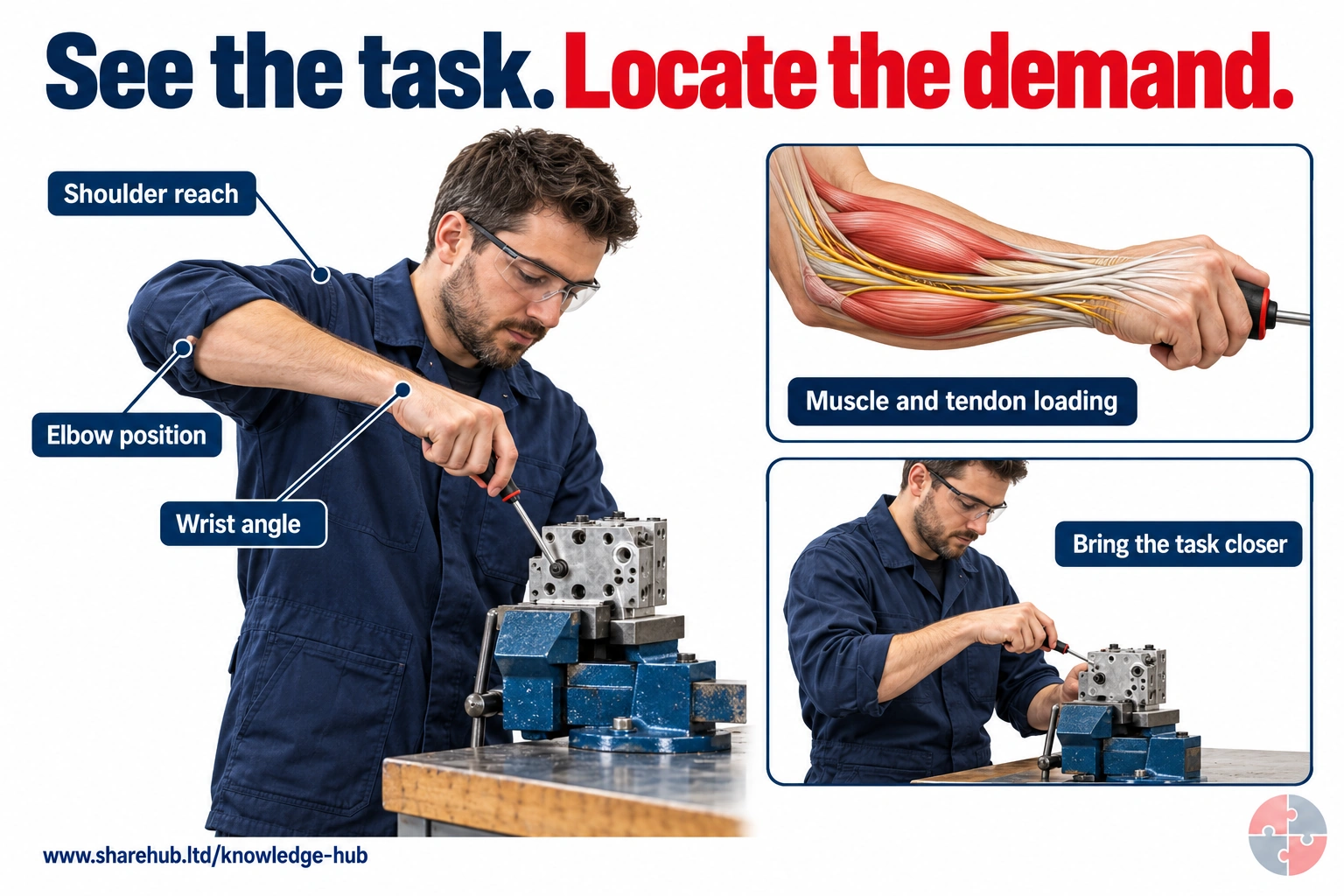
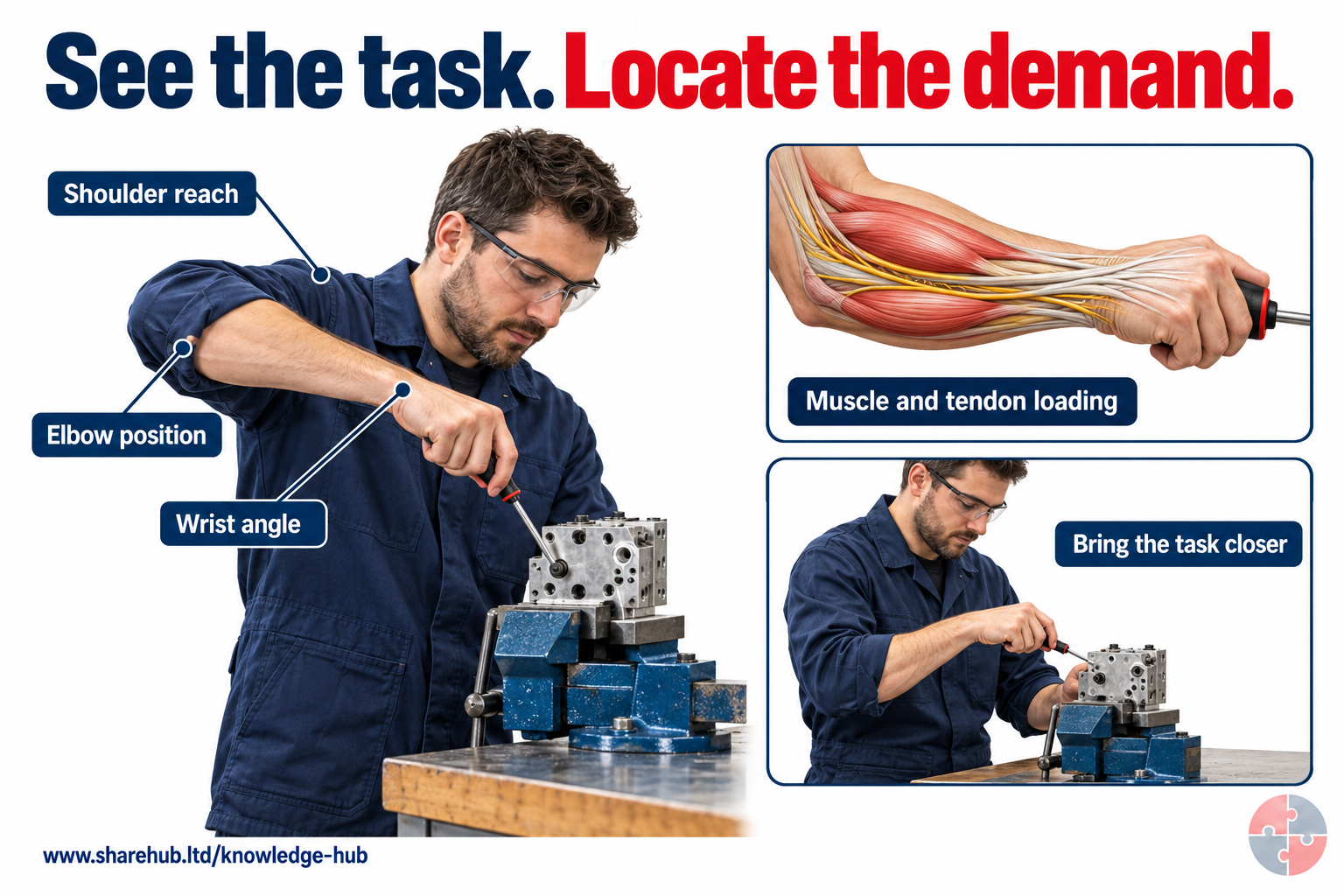
Task layout can increase reach and sustained muscle or tendon demand. Use the scene to examine the work rather than diagnose the worker.
What change could reduce unnecessary demand?
Adjust the work height and position, use a fixture and bring the task within comfortable reach.
Qualitative anatomy and task comparison; no load calculation, diagnosis or injury prediction.
Source guidance: HSE guidance
Identify the source, route to the person, early signal, strongest practicable control and stop decision. Test that decision in real work and after change.
| Exposure | Harm route | Control and hold point |
|---|---|---|
| Repetitive packing or assembly | Repeated gripping and wrist movement can overload tendons and nerves. | Reduce force and repetition through layout, tools, fixtures and pace; act on symptoms. |
| Extended display screen work | Static posture, reach and poor setup can contribute to discomfort. | Assess the actual DSE user and setup, vary activity and correct equipment position. |
| Forceful or vibrating tool use | Force, awkward reach and vibration combine with duration. | Choose a suitable tool and fixture, reduce exposure and seek specialist assessment when needed. |
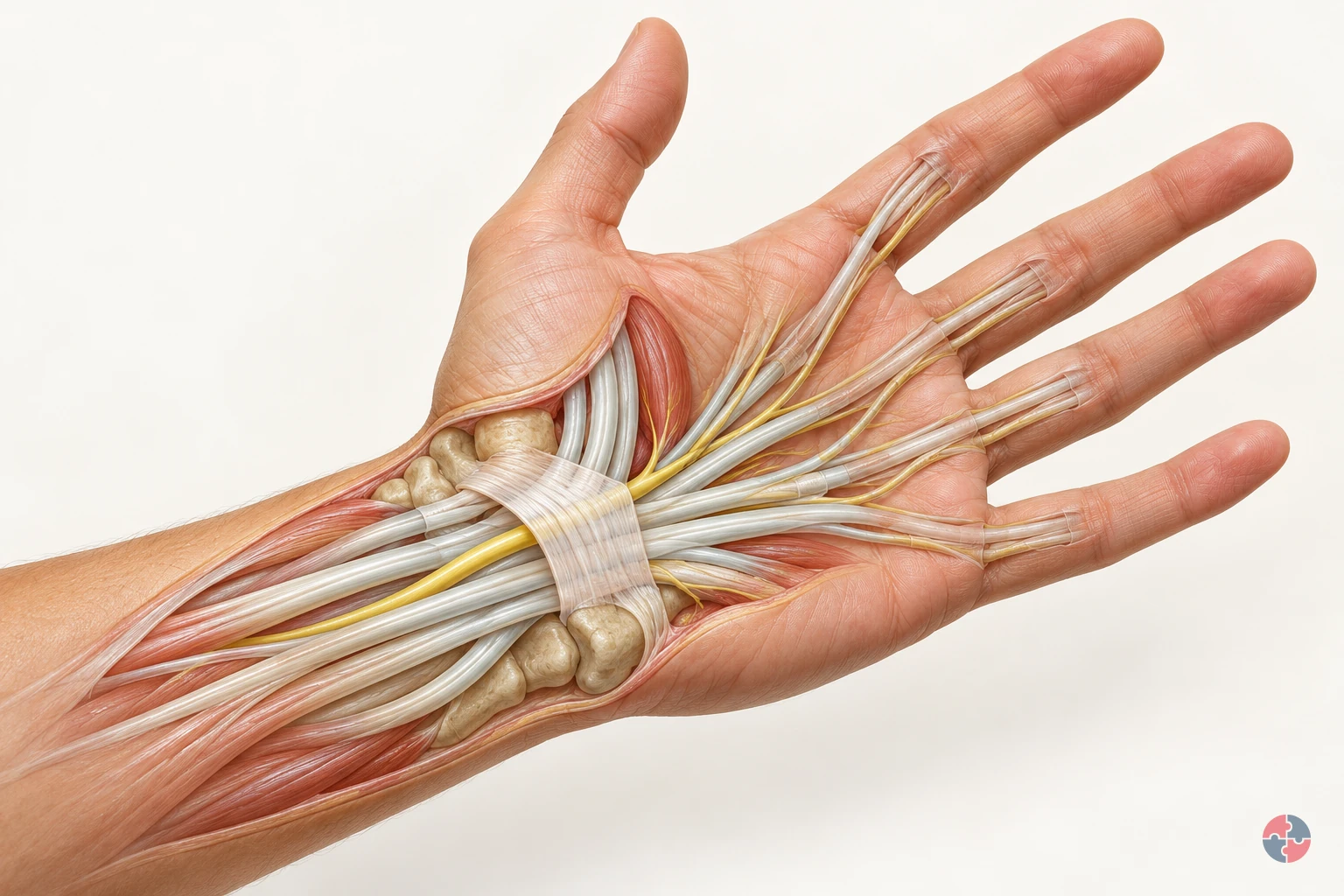
How does a working hand move, and what changes in nerve and tendon problems?
Interactive anatomy · Tendons, nerves and cushioning tissues · Updated 2026-10-23
Read all anatomy and process explanations without the viewer
General anatomy and example mechanisms, not diagnosis, treatment choice or fitness-for-work assessment. These are examples of mechanisms. Similar symptoms can have different causes. Self-provocation or nerve-tapping tests Exercise or stretching prescriptions Automatic symptom classification or a generic RSI lesion Treatment, return-to-work clearance or a task-based diagnosis Unreviewed shoulder, medial-elbow or trigger-finger damage overlays The prepatellar-bursitis route requires the dedicated labelled front-of-knee inset. A wrist/shoulder substitute is not suitable. Prompt-help text remains outside the model and scenarios.
Forearm flexor muscles
These muscles contract and pull through tendons to bend the fingers and thumb. The forearm flexor muscles generate the pull transmitted through tendons into the fingers and thumb. As the illustrated grip closes, follow the muscle region towards those slender connections. Their action bends the finger joints; the tendon transfers the pull rather than generating it. The visible shape change makes this relationship clearer and does not measure muscle effort. Gloucestershire Hospitals NHS Foundation Trust: Flexor Tendon Injuries
Flexor tendons
These tendons carry muscle force into the hand. Flexor tendons connect forearm muscles with bones in the hand. Their glide lets a muscle’s pull bend the finger joints while guided paths keep the tendons near the skeleton. Nine flexor tendons pass through the carpal tunnel. Compare their mechanical role with the nearby median nerve, which carries signals rather than pulling on bone. Gloucestershire Hospitals NHS Foundation Trust: Flexor Tendon Injuries · Whittington Health NHS Trust: Carpal Tunnel Syndrome
Tendon sheath
The sheath surrounds the tendon and supports smooth glide. A tendon sheath surrounds and supports a tendon as it glides. Along the fingers, pulley structures help keep the tendon close to the bones so its pull acts along a guided route. Watch the tendon move relative to its surroundings. A sheath is part of that supporting passage, not another muscle producing the same pull. Gateshead Health NHS Foundation Trust: Trigger Finger/Thumb Release Surgery
Carpal bones
Eight small carpal bones make up the wrist. Their curved arrangement forms the bony side of the carpal tunnel. The transverse carpal ligament closes the tunnel across the palm side. King’s College Hospital NHS Foundation Trust: Carpal tunnel syndrome — patient information · Kent Community Health NHS Foundation Trust: Carpal tunnel syndrome guide for patients
Transverse carpal ligament
This strong ligament spans the palm side of the wrist. It forms the roof above the median nerve and flexor tendons. Separating layers in the model helps reveal these relationships. King’s College Hospital NHS Foundation Trust: Carpal tunnel syndrome — patient information · Whittington Health NHS Trust: Carpal Tunnel Syndrome
Median nerve
The median nerve carries signals for feeling and some thumb movement. The median nerve carries sensory information from the thumb, index and middle fingers and part of the ring finger, and helps control some thumb muscles. Follow its branches beyond the shared wrist passage. The cyan travel cue represents communication; it is not a visible electrical flash, a nerve-speed measurement or a map for diagnosing altered sensation. NHS: Carpal tunnel syndrome · Kent Community Health NHS Foundation Trust: Carpal tunnel syndrome guide for patients · Whittington Health NHS Trust: Carpal Tunnel Syndrome
Thumb tendon: APL
Abductor pollicis longus helps move the thumb away from the hand. APL passes along the thumb side of the wrist through the first dorsal compartment. Follow it towards the base of the thumb. Ashford and St Peter’s Hospitals NHS Foundation Trust: De Quervains · Wrightington, Wigan and Leigh Teaching Hospitals NHS Foundation Trust: De Quervain’s Syndrome
Thumb tendon: EPB
Extensor pollicis brevis helps straighten the thumb. EPB travels beside APL through the first dorsal compartment on the thumb side of the wrist. Ashford and St Peter’s Hospitals NHS Foundation Trust: De Quervains · Wrightington, Wigan and Leigh Teaching Hospitals NHS Foundation Trust: De Quervain’s Syndrome
First dorsal compartment
A small passage on the thumb side of the wrist guides APL and EPB. The tendons normally glide through their sheath here. This is the location of the De Quervain’s example; the carpal tunnel lies on the palm side. Ashford and St Peter’s Hospitals NHS Foundation Trust: De Quervains · Wrightington, Wigan and Leigh Teaching Hospitals NHS Foundation Trust: De Quervain’s Syndrome
Outer elbow tendon attachment
Forearm tendons attach to bone near the outside of the elbow. Forearm extensor tendons attach near the bony point on the outside of the elbow, the lateral epicondyle. These muscles extend and help steady the wrist during gripping. Link the closer attachment view with the tool task to see why an elbow structure matters during hand use. Pain here does not establish a torn or detached tendon. NHS: Tennis elbow · Berkshire Healthcare NHS Foundation Trust: Advice and resources: Lateral elbow tendinopathy · Newcastle Hospitals NHS Foundation Trust: Tennis elbow
Prepatellar bursa
A fluid-containing sac helps reduce friction at the front of the kneecap. The prepatellar bursa lies between the kneecap and the overlying soft tissues, outside the knee joint. Its fluid-containing structure helps cushioning and smooth glide over bone. Compare the closer view with the worker’s knee contact in the floor task. The normal view locates the sac; it does not diagnose inflammation or measure pressure during kneeling. NHS: Bursitis · Leeds Community Healthcare NHS Trust: About pre-patella bursitis
Open the complete process transcript
The process, step by step
Watch muscles pull and tendons glide
The forearm muscles provide much of the pull that closes the fingers around an object. When these muscles contract, their tendons transmit force into the hand and pull on the finger bones, bending the joints. The tendons glide along guided paths rather than pulling away from the fingers like loose cords. Follow the muscle-to-tendon connection as the illustrated grip closes, then follow the return movement as the hand opens. The model enlarges this motion so that you can connect the movement at the fingers with the working structures farther up the forearm. Gloucestershire Hospitals NHS Foundation Trust: Flexor Tendon Injuries · Gateshead Health NHS Foundation Trust: Trigger Finger/Thumb Release Surgery
What to watch: Look from the forearm muscle bellies towards the slender flexor tendons, then follow their paths into the fingers around the handle.
Why it matters: Tendons transfer a muscle’s mechanical pull to bone, allowing joints to move. Guided tendon paths help direct that pull through the hand; the nerve has a different role in signalling.
Explore this step: Pause during the grip and trace one tendon from its forearm muscle towards the finger.
Watch tendon glide through the wrist
The carpal tunnel is a passage at the wrist, with a bony boundary formed by the carpal bones and a strong ligament spanning the palm side. Nine flexor tendons and the median nerve pass through this shared space. The tendons transmit the pull that helps bend the fingers and thumb; the nerve carries signals. Follow the tendon movement beneath the ligament roof and compare it with the nerve’s position. The cutaway separates the layers for learning, but these structures normally remain close together within a connected wrist. King’s College Hospital NHS Foundation Trust: Carpal tunnel syndrome — patient information · Kent Community Health NHS Foundation Trust: Carpal tunnel syndrome guide for patients · Whittington Health NHS Trust: Carpal Tunnel Syndrome
What to watch: Find the carpal bones and ligament roof, then compare the flexor tendons with the median nerve passing through the same wrist passage.
Why it matters: The tunnel brings several structures through a compact part of the wrist. Understanding their different functions explains why tendon glide and nerve signalling must be explored separately even though they occupy nearby space.
Explore this step: Use the labels to identify the tunnel boundary, a tendon and the nerve without changing to an injury example.
Follow the nerve signal
The median nerve links part of the hand with the nervous system. It carries sensory information from the thumb, index finger, middle finger and part of the ring finger, and helps control some muscles at the base of the thumb. Follow the cyan travelling cue along the nerve and into its branches. This colour illustrates signalling; a real nerve does not visibly light up. Compare that pathway with the tendons beside it: tendons transfer mechanical pull, whereas the nerve carries information. The simplified branches are a teaching map, not a test of a person’s sensation. Kent Community Health NHS Foundation Trust: Carpal tunnel syndrome guide for patients · Whittington Health NHS Trust: Carpal Tunnel Syndrome
What to watch: Follow the cyan cue along the median nerve through the wrist into the palm, keeping the adjacent tendons in view.
Why it matters: Sensation helps the nervous system receive information from the hand, while motor signals contribute to thumb control. Distinguishing information from mechanical pull makes the coordinated hand function easier to understand.
Explore this step: Compare the nerve cue with tendon glide and explain which one represents information and which represents force transfer.
Follow the thumb tendons
Two tendons run along the thumb side of the wrist through the first dorsal compartment. They connect forearm muscles to the thumb and glide as the thumb changes position. Abductor pollicis longus, labelled APL, helps move the thumb away from the hand. Extensor pollicis brevis, labelled EPB, helps straighten it. Follow the two labelled paths rather than assuming they pass through the palm-side carpal tunnel. The model brings their movement and location into view so that the separate actions and their shared guiding passage can be understood together. Ashford and St Peter’s Hospitals NHS Foundation Trust: De Quervains · Wrightington, Wigan and Leigh Teaching Hospitals NHS Foundation Trust: De Quervain’s Syndrome
What to watch: Find APL and EPB beside the thumb side of the wrist, then follow both labelled paths through the first dorsal compartment.
Why it matters: Different tendon actions contribute to positioning the thumb for hand use. Their shared passage guides glide, but the two tendons retain different attachments and functions; they are not interchangeable parts.
Explore this step: Select each tendon in turn and connect its name with the thumb movement described in the explanation.
Follow the elbow during a tool task
A tool task involves more than the muscles that visibly close the fingers. Forearm extensor muscles also help hold the wrist steady while the hand grips. Follow these muscles back towards their tendon attachment near the bony point on the outside of the elbow, called the lateral epicondyle. Watch the technician’s illustrated grip and tool turn, then use the closer elbow view to connect the activity with this attachment. A moving tool does not demonstrate a damaged tendon: the normal task and the separate tissue example explain different things. NHS: Tennis elbow · Newcastle Hospitals NHS Foundation Trust: Tennis elbow
What to watch: Watch the hand grip the screwdriver, then follow the working forearm towards the tendon attachment on the outside of the elbow.
Why it matters: Wrist stability helps the hand grip and use an object, so a tendon attachment near the elbow can be involved in a hand task. Movement alone does not show injury or quantify the demand.
Explore this step: Switch between Work activity and Elbow cutaway and describe how the two views relate to the same task.
Locate the bursa in front of the kneecap
The prepatellar bursa is a small fluid-containing sac in front of the kneecap. It helps the overlying soft tissues move across the bone with less friction. First locate the front of the knee in the floor-laying task, then follow the linked closer view to the thin sac outside the knee joint. This shows where contact during kneeling relates to the anatomy; the bursa is not a cushion inside the joint. The normal location lesson remains separate from the example of bursal irritation, and the short model sequence does not predict when symptoms would occur. Leeds Community Healthcare NHS Trust: About pre-patella bursitis · NHS Musculoskeletal Matters Dorset: Prepatellar bursitis
What to watch: Locate the kneeling worker’s front-of-knee contact, then find the thin bursa between the kneecap and the overlying soft tissues in the close view.
Why it matters: Glide between soft tissue and bone is a different function from movement inside the knee joint. Locating the bursa makes the relevant contact area clear without inferring tissue damage from posture alone.
Explore this step: Compare Floor-laying task with Knee cutaway and identify which side of the kneecap contains the bursa.
Read the practice situations and all answer explanations
Sources and how the model is made
The opening images are AI-generated anatomical illustrations. The interactive 3D models and labelled SVG diagrams use original procedural artwork. These teaching images are not medical scans or diagnostic tools. Source references support the learner explanations and do not grant artwork rights.
- Health and Safety Executive: Upper limb disorders — Multiple work factors, task redesign, force/repetition/posture/duration, worker involvement and early reporting. Risk scores are not diagnosis.
- NHS: Carpal tunnel syndrome — Median-nerve pressure, potential sensory and functional effects, varied contributors and clinical assessment. No treatment or self-test generated.
- King’s College Hospital NHS Foundation Trust: Carpal tunnel syndrome — patient information — Bony tunnel boundary and transverse carpal-ligament roof. Text only, no third-party credited artwork copied. Printed review date September 2026 requires recheck at clinical sign-off; corroborates NHS anatomy.
- Ashford and St Peter’s Hospitals NHS Foundation Trust: De Quervains — APL and EPB actions and thumb-side first dorsal compartment. Indexed primary-page text rechecked, updated 28 April 2026; corroborated by directly retrieved UL8. No treatment recommendations or artwork copied.
- NHS: Tennis elbow — Outer-elbow location, tendon attachment and possible repeated gripping/twisting context. More precise tendinopathy wording corroborated by UL12/UL14; no blanket inflammation claim.
- NHS: Bursitis — Fluid-sac cushioning, inflammation and pressure-reduction context. Printed next-review date 30 October 2026 should be rechecked at sign-off.
- NHS: Tendonitis — General tendon role and urgent professional advice for severe pain or suspected rupture. Printed next-review date June 2026 is overdue: recheck before clinical approval. No treatment/exercise regimen reused.
- Wrightington, Wigan and Leigh Teaching Hospitals NHS Foundation Trust: De Quervain’s Syndrome — Directly retrieved January 2026 leaflet, expiry January 2028: APL/EPB, thumb-side first dorsal compartment and constrained sheath glide. Anatomy/mechanism only; no exercises or artwork copied.
- Gloucestershire Hospitals NHS Foundation Trust: Flexor Tendon Injuries — Directly retrieved: flexor tendons connect forearm muscles to finger bones and transmit their pull. Used for normal function only; no injury prognosis, treatment instructions or artwork reused.
- Gateshead Health NHS Foundation Trust: Trigger Finger/Thumb Release Surgery — Directly retrieved normal tendon/sheath distinction and guiding finger pulleys only. Printed review date September 2026 remains overdue; no trigger-finger overlay, surgical advice or exercise regimen reused.
- Ashford and St Peter’s Hospitals NHS Foundation Trust: Carpal Tunnel — Median-nerve sensory/motor role and flexor tendons within the tunnel. Indexed primary text verified, updated 28 April 2026; direct retrieval failed. Recheck live source at clinical sign-off.
- Berkshire Healthcare NHS Foundation Trust: Advice and resources: Lateral elbow tendinopathy — Painful forearm tendon attachment near the outside of the elbow and possible repetitive work demands. No treatment regimen, recovery prediction or artwork copied.
- Leeds Community Healthcare NHS Trust: About pre-patella bursitis — Dedicated bursa in front of kneecap, cushioning/glide, kneeling/direct injury/infection and urgent GP assessment for fever or feeling unwell. No treatment selection.
- NHS MyHealth Devon: Golfers & Tennis Elbow — Forearm tendon attachments and tendinopathy wording: not equated with simple inflammation. No rehabilitation or prognosis claims reused.
- NHS Musculoskeletal Matters Dorset: Prepatellar bursitis — Front-of-knee friction-reducing sac; prolonged kneeling, direct injury and infection as distinct possible causes. No medicine or cooling regimen reused.
- Kent Community Health NHS Foundation Trust: Carpal tunnel syndrome guide for patients — Directly retrieved, last edited 9 July 2025: eight carpal bones, ligament boundary, median-nerve sensory/motor role and tendon passage. Anatomy facts paraphrased only; no clinical regimen or artwork copied.
- Whittington Health NHS Trust: Carpal Tunnel Syndrome — Directly retrieved, updated 7 August 2025: nine tendons and median nerve in the carpal tunnel, nerve function and cautious attribution of work contribution. Normal anatomy corroborated by Sherwood Forest Hospitals NHS leaflet PIL202409-06-CTS; that leaflet has a September 2026 review date. No treatment recommendations or artwork reused.
- Newcastle Hospitals NHS Foundation Trust: Tennis elbow — Directly retrieved, last updated 3 November 2025: forearm tendons attach at the lateral epicondyle; these muscles extend the wrist and take part in gripping. Used for extensor anatomy and task explanation only; no treatment regimen, work-clearance advice or artwork copied.
- Health and Safety Executive: Lower limb disorders — Directly retrieved, updated 27 March 2025: repeated kneeling and knee bursitis; review working methods, mechanical aids, task variation, breaks, seating where possible, and suitable knee pads or matting. Used for prevention principles only; no numerical kneeling threshold, diagnosis or guarantee of protection.
How should an upper-limb risk assessment start?
Observe the actual task with workers, identify who is exposed and for how long, map interacting risk factors, choose source controls, then check whether the changed work is better.
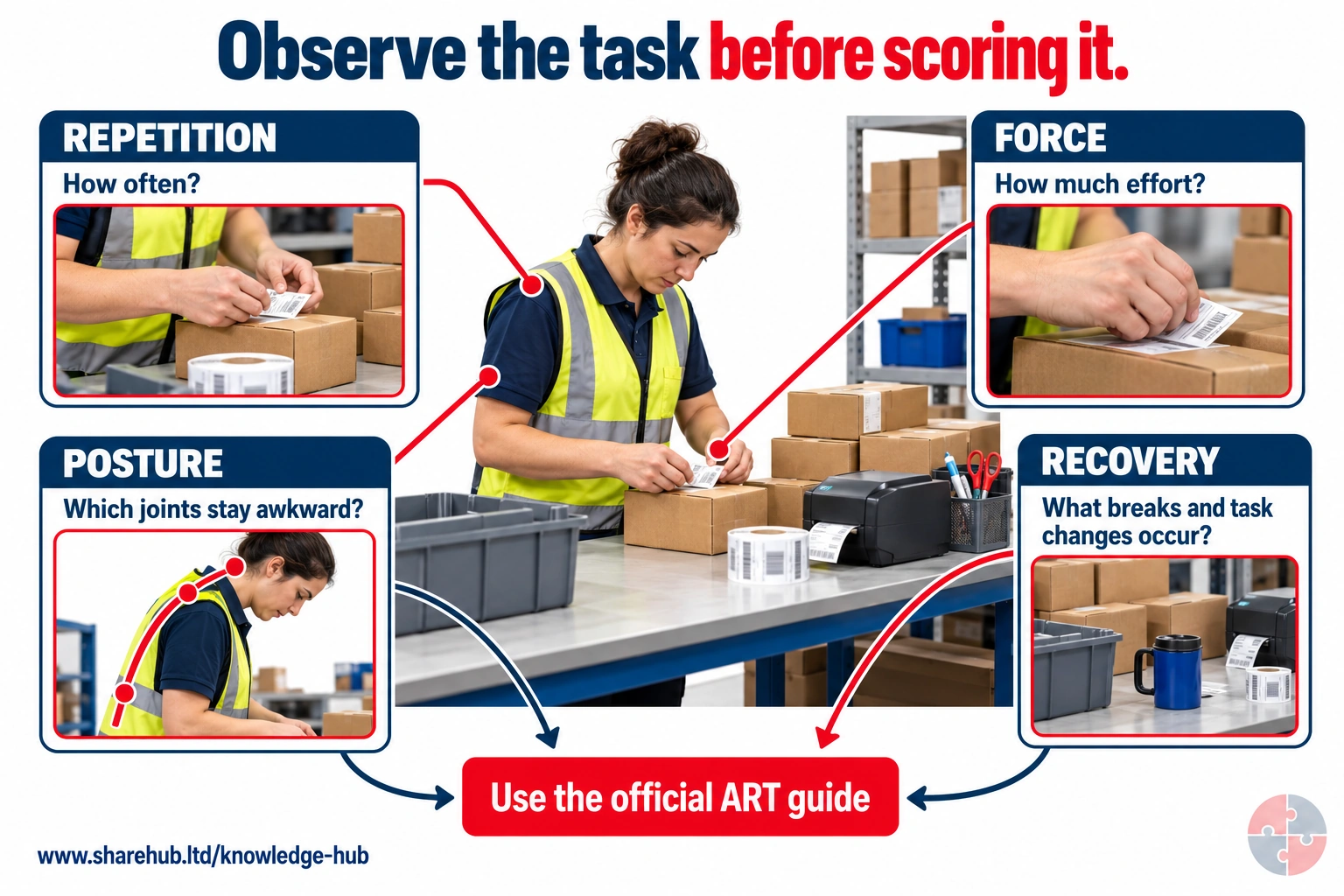
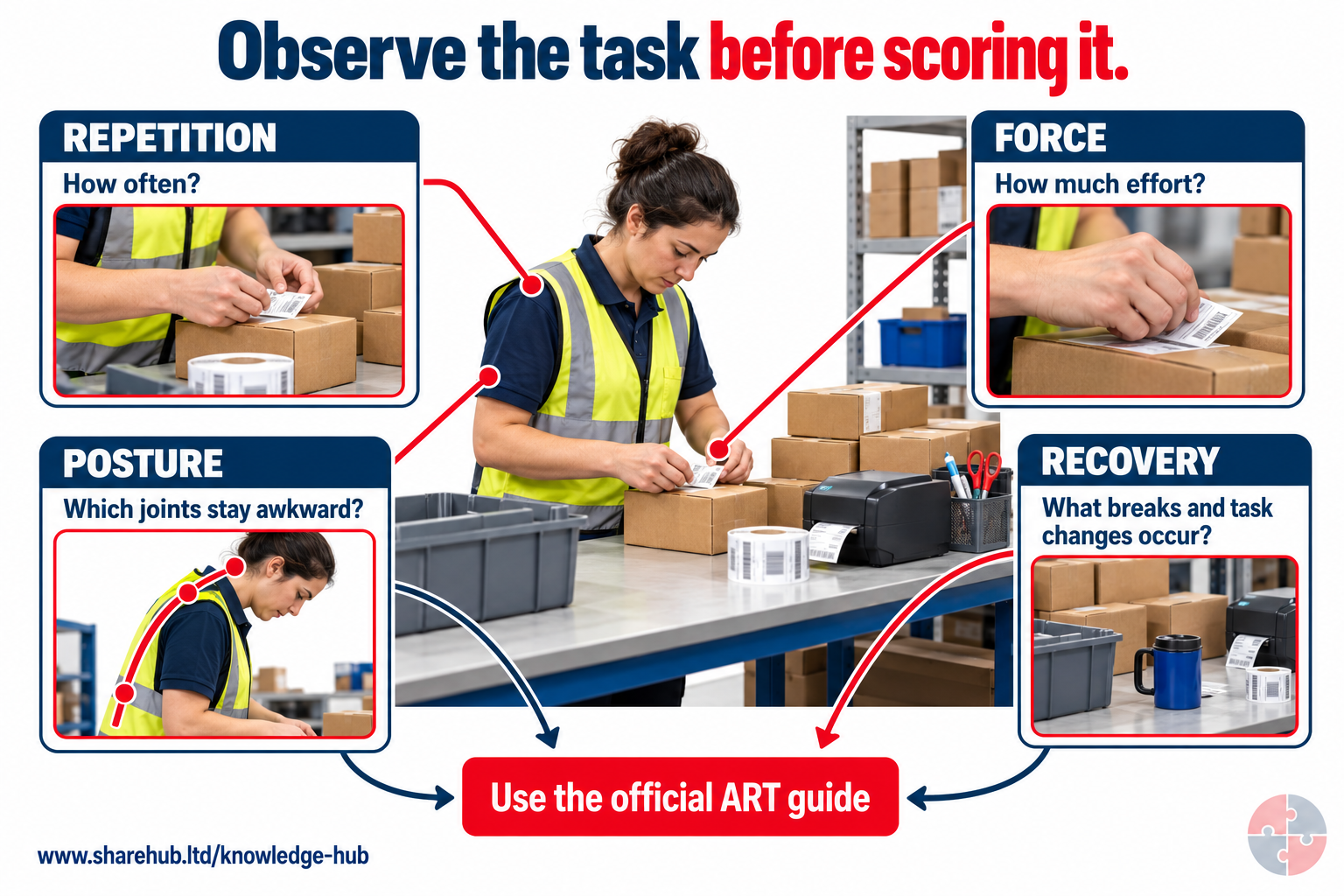
The packing task links observation to repetition, force, posture and recovery evidence. These are observation prompts, not an altered version of HSE's ART scoring method; use the official assessment guide for the complete assessment.
Can this still image supply an ART score?
No. Observe representative task cycles, force and work patterns, then apply the official guide.
Static scene does not establish frequency, force, daily duration or a risk score.
Source guidance: HSE guidance
Record ordinary and peak cycles, tool or item variation, work height, reach, force, breaks, symptoms and individual needs. A photograph, checklist or risk score alone misses work pace and user experience. Obtain competent ergonomics advice if the cause or control is uncertain.
| Step | Evidence | Hold |
|---|---|---|
| Observe | Task cycle, load, equipment and worker account. | Assessment differs from real work. |
| Decide | Risk factors and feasible redesign. | High risk without a control plan. |
| Trial | User feedback and measured task change. | New control creates another hazard. |
| Review | Symptoms, quality and action closure. | Controls ineffective. |
Is the HSE two-hour ULD filter a safe limit?
No. The approximate two-hour item in HSE’s simple filter is a prompt for fuller assessment, not permission to ignore shorter work with high repetition, force, awkward posture or a vulnerable worker.
A yes answer warrants fuller assessment; a no answer is not a guarantee of no risk where conditions or people differ. Respond to symptoms and changes regardless of duration. Do not turn Assessment of Repetitive Tasks (ART) scores into clinical diagnoses.
Forceful short task. Action: Assess fully; Why: Risk can arise below two hours.
Worker has symptoms. Action: Change task and seek advice; Why: Filter cannot diagnose.
New faster line. Action: Reassess actual pace; Why: Old screen is invalid.
When is ART useful, and when is it not?
Use HSE’s ART tool to analyse repetitive upper-limb tasks and prioritise controls; use the DSE workstation route for screen work. ART alone may not cover individual and wider job factors.
Record both arms where appropriate, actual frequency, force, posture, breaks and pace. ART is not intended for DSE assessments, and a low colour or score does not cancel a credible symptom report. Manual-handling and vibration risks may require their own assessments.
| Task | Primary route | Extra check |
|---|---|---|
| Conveyor packing | ART plus full task context. | Belt speed, reach and worker fit. |
| Daily computer user | DSE workstation assessment. | Job demands and individual needs. |
| Powered vibrating tool | Task ergonomics plus vibration route. | Do not bury hand-arm vibration (HAV) risk in ART. |
Who is a DSE user?
HSE describes DSE users as workers who use screens daily for continuous periods of an hour or more; apply the DSE route to their fixed, mobile, home and hot-desk work.
Occasional short screen use does not trigger the DSE Regulations in the same way, but general workplace risk duties still apply. The one-hour description identifies scope; it is not a safe exposure limit or a compulsory break interval. Check the worker’s actual pattern.
Daily sustained screen work. Assessment route: Individual DSE assessment; Boundary: Check home and office as used.
Infrequent short use. Assessment route: General work-risk review; Boundary: Act on discomfort or hazards.
Hot desk. Assessment route: Basic setup check at each change; Boundary: Escalate repeated or unresolved issues.
What makes a DSE assessment complete?
Check the whole workstation, the job and the individual: screen, keyboard, pointing device, chair, surface, lighting, space, breaks and any special needs; assign and close actions.
Workers may self-assess after suitable training, but a trained assessor must review all returned self-assessment results, resolve doubtful points, give feedback and confirm that problems are put right. Reassess for new users or setups, material changes and complaints of discomfort. A software pass is not proof of control.
| Input | Check | Evidence |
|---|---|---|
| Equipment | Screen, input, chair and work surface fit. | Setup and action record. |
| Work | Pace, duration, breaks and visual demand. | Work-plan change. |
| Person | Comfort, access and any individual need. | Agreed adjustment and review. |
How should a screen workstation be adjusted?
Set the chair, screen and input devices so the user can work comfortably with supported feet, relaxed shoulders, nearby keyboard and pointer, readable display and room to change posture.
There is no single correct frozen posture. Match layout to task and user, reduce glare by positioning screen and light, and use suitable separate input devices for sustained laptop work when assessment calls for them. Trial changes with the user and check comfort over real work.
| Element | Adjustment check | Escalate |
|---|---|---|
| Chair and feet | Support and movement possible. | Range does not fit user. |
| Screen and documents | Readable without repeated twisting. | Glare or persistent neck strain. |
| Keyboard and pointer | Close, suitable and not forcing wrist bend. | Pain or device mismatch. |
Try the setup in a useful order
Start with seat support, feet or footrest and working height. Bring keyboard and mouse close enough for relaxed shoulders and approximately horizontal forearms. Position the readable display to limit repeated neck bending and glare, then trial the actual task and allow posture changes. These are starting guides, not a fixed posture: bifocals, disability, unusual equipment or unresolved fit need individual adjustment and trained follow-up; a site visit is not required for every simple return.
How often must DSE users take breaks?
Employers must plan breaks or changes of activity for DSE users, but the law does not set one universal interval; fit short, frequent changes to the actual work before fatigue builds.
A change from keyboarding to another hand-intensive repetitive task may not give the arms recovery. Breaks or changes must not simply compress the same workload into less time. Let users vary posture and move where practicable. HSE examples are guidance, not mandatory numerical limits.
| Work pattern | Decision | Check |
|---|---|---|
| Mixed screen and non-screen work | Use genuine change of visual and hand demand. | No catch-up pressure. |
| Continuous data entry | Plan deliberate breaks. | Before fatigue, not after. |
| Timer reminder | Use as prompt only. | Work design still allows break. |
Are DSE users entitled to an eye test?
In the GB DSE route, a user who asks for an eye test must be offered one at employer expense; special glasses are employer-funded only if prescribed specifically for DSE viewing distance.
Use the separate NI DSE route for Northern Ireland, where HSENI also describes requested tests and DSE-only glasses. Eye strain should prompt both a screen and lighting review and the appropriate eyesight route. Ordinary prescription glasses are not automatically funded.
User asks for test. Action: Arrange and pay under applicable DSE rules; Limit: Do not wait for symptoms.
Special DSE glasses prescribed. Action: Provide according to findings; Limit: Not a blanket frame allowance.
Glare and eye fatigue. Action: Adjust screen and light too; Limit: Test does not replace assessment.
Does home or hybrid work need a DSE assessment?
Yes where DSE rules apply: assess the actual home and office arrangements, train the user, resolve identified risks and review changes; do not assume a home desk or worker-owned equipment is suitable.
A trained self-assessment may be enough initially, but complex needs may require a DSE assessor or occupational health advice. If assessment shows equipment is needed to control risk, the worker cannot be charged. Privacy and access arrangements should be agreed, not assumed.
Home. Check: Screen, input, chair, space, light and work routine; Owner: Employer and worker.
Office or hot desk. Check: Usable settings and shared adjustment range; Owner: Facilities and assessor.
Hybrid change. Check: Both setups and travel/portable use; Owner: Line manager.
How can the hierarchy of controls reduce upper-limb strain through safer workstation and task design?
Remove the hazard where reasonably practicable. If it remains, consider a safer method, engineering controls and safe work arrangements before personal protective equipment for residual risk.
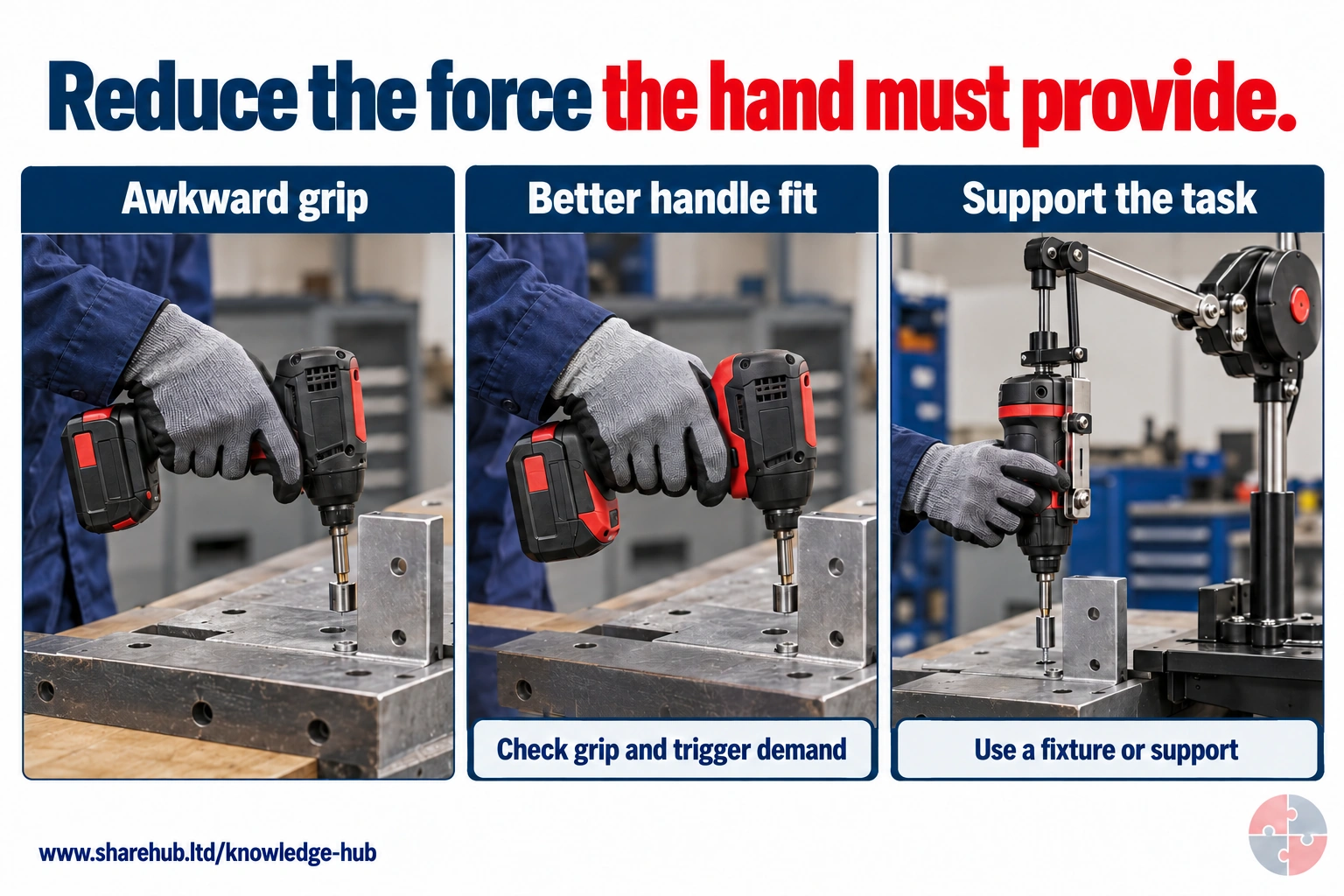
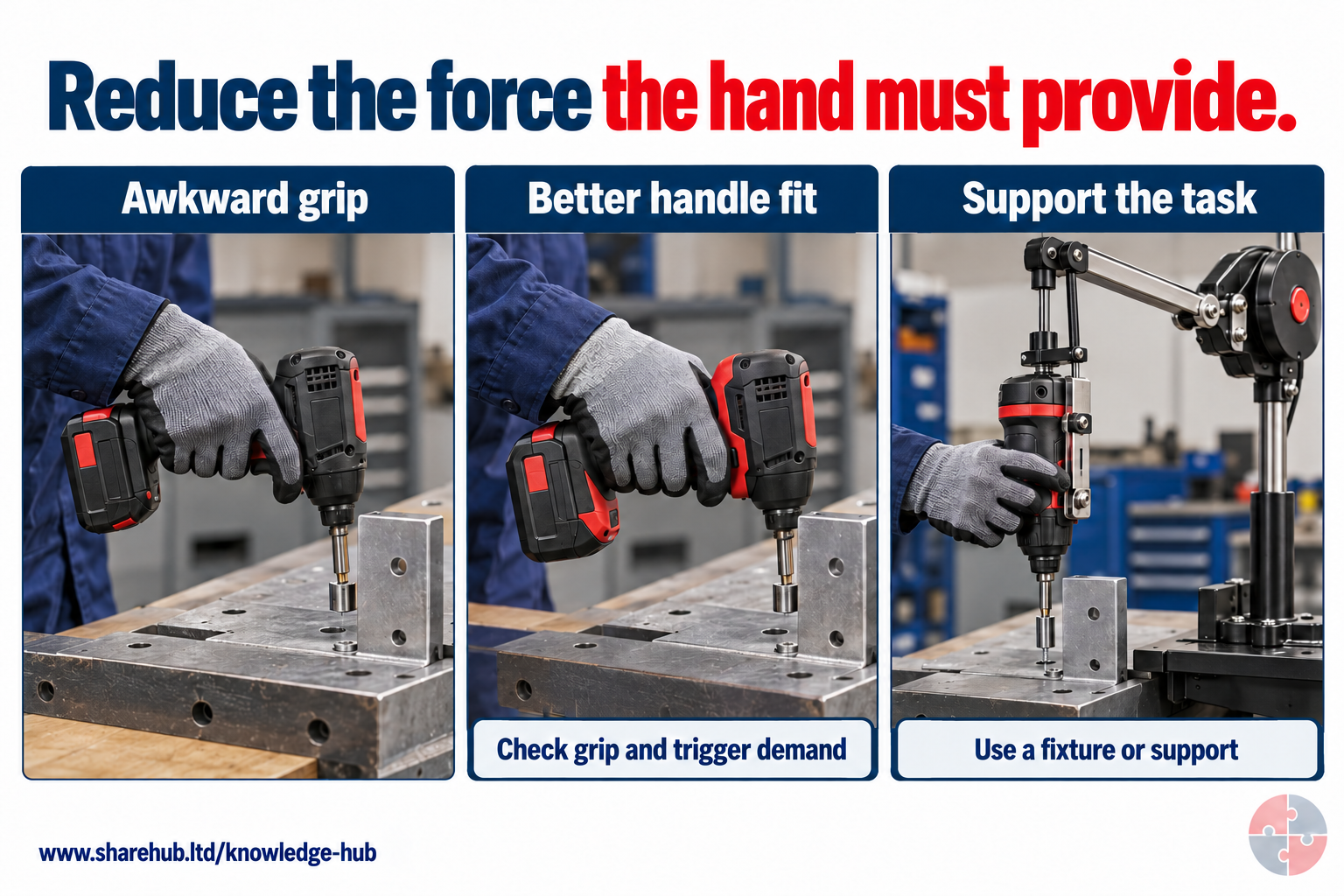
Handle fit and trigger operation matter, but fixtures and tool support may remove more sustained force than asking someone to grip differently.
Which option changes the task rather than only the grip?
A suitable fixture or supported tool can reduce the holding and reaction force the hand must supply.
Qualitative examples; selection requires the tool, glove, user, torque reaction and actual task.
Source guidance: HSE guidance
HSE places elimination, substitution, engineering, administrative controls and personal protective equipment in that order. Verify that the chosen controls work on the actual task.
ERICPD (Eliminate, Reduce including substitution, Isolate, Control, personal protective equipment, Discipline) is a SHARE decision prompt cross-mapped to HSE’s five-level hierarchy. For upper-limb risk, the measure must change force, repetition, posture or recovery in the actual task. Assess non-DSE work and display-screen work separately; gloves or training cannot compensate for a harmful cycle.
How can the ERICPD hierarchy of controls reduce upper-limb strain through safer workstation and task design?

| ERICPD prompt | HSE relation | Task-specific control | Owner, check and hold point |
|---|---|---|---|
| Eliminate | Elimination | Remove repeated hand finishing or unnecessary duplicate keyboard entry by redesigning the job or information flow. | Process owner measures cycles and worker-reported discomfort after change. Hold the task if the removed step returns or symptoms escalate. |
| Reduce, including substitution | Substitution or safer method | Specify a lower-force tool, pre-fitted component or less repetitive input method for the actual material and hand size; test grip and quality. | Engineering owner trials the substitute with workers and checks force, cycle time and defects. Reject it if load shifts to another joint or worker. |
| Isolate | Engineering controls | Install an adjustable fixture, tool balancer or correctly positioned feed so wrists stay near neutral and reaching is reduced; set the DSE screen and input devices for the user. | Engineer or DSE assessor verifies position in the real task and maintains the fixture. Stop if adjustment slips or guarding is compromised. |
| Control | Administrative controls | Set a sustainable pace, task variation and recovery opportunities, train the correct setup, and provide an early symptom route without waiting for diagnosis. | Supervisor checks exposure duration and worker feedback, then reassesses after task or staffing change. Hold or redesign when symptoms or controls fail. |
| PPE | PPE for another residual hazard, not the loading mechanism | Select a glove only where the material or tool hazard requires it and confirm fit, grip and dexterity; it does not remove repetition or awkward posture. | Safety owner checks compatibility and condition with the worker. Reject gloves that increase grip force or hide worsening symptoms. |
| Discipline | Maintain and learn across all levels | Maintain fixtures and tools, repeat ART or DSE review when the task changes, and close worker reports with an owner and date. | Operations owner checks maintenance, assessment and symptom trends. Reopen the control decision if discomfort or workarounds persist. |
How can the ISO 45001 hierarchy of controls reduce upper-limb strain through safer workstation and task design?

| ERICPD prompt | HSE relation | Task-specific control | Owner, check and hold point |
|---|---|---|---|
| Eliminate | Elimination | Remove repeated hand finishing or unnecessary duplicate keyboard entry by redesigning the job or information flow. | Process owner measures cycles and worker-reported discomfort after change. Hold the task if the removed step returns or symptoms escalate. |
| Reduce, including substitution | Substitution or safer method | Specify a lower-force tool, pre-fitted component or less repetitive input method for the actual material and hand size; test grip and quality. | Engineering owner trials the substitute with workers and checks force, cycle time and defects. Reject it if load shifts to another joint or worker. |
| Isolate | Engineering controls | Install an adjustable fixture, tool balancer or correctly positioned feed so wrists stay near neutral and reaching is reduced; set the DSE screen and input devices for the user. | Engineer or DSE assessor verifies position in the real task and maintains the fixture. Stop if adjustment slips or guarding is compromised. |
| Control | Administrative controls | Set a sustainable pace, task variation and recovery opportunities, train the correct setup, and provide an early symptom route without waiting for diagnosis. | Supervisor checks exposure duration and worker feedback, then reassesses after task or staffing change. Hold or redesign when symptoms or controls fail. |
| PPE | PPE for another residual hazard, not the loading mechanism | Select a glove only where the material or tool hazard requires it and confirm fit, grip and dexterity; it does not remove repetition or awkward posture. | Safety owner checks compatibility and condition with the worker. Reject gloves that increase grip force or hide worsening symptoms. |
| Discipline | Maintain and learn across all levels | Maintain fixtures and tools, repeat ART or DSE review when the task changes, and close worker reports with an owner and date. | Operations owner checks maintenance, assessment and symptom trends. Reopen the control decision if discomfort or workarounds persist. |
How should a non-DSE workstation be designed?
Bring work within comfortable reach, set usable height and orientation for the task and range of workers, support workpieces and reduce grip, twist and repeated movement at source.
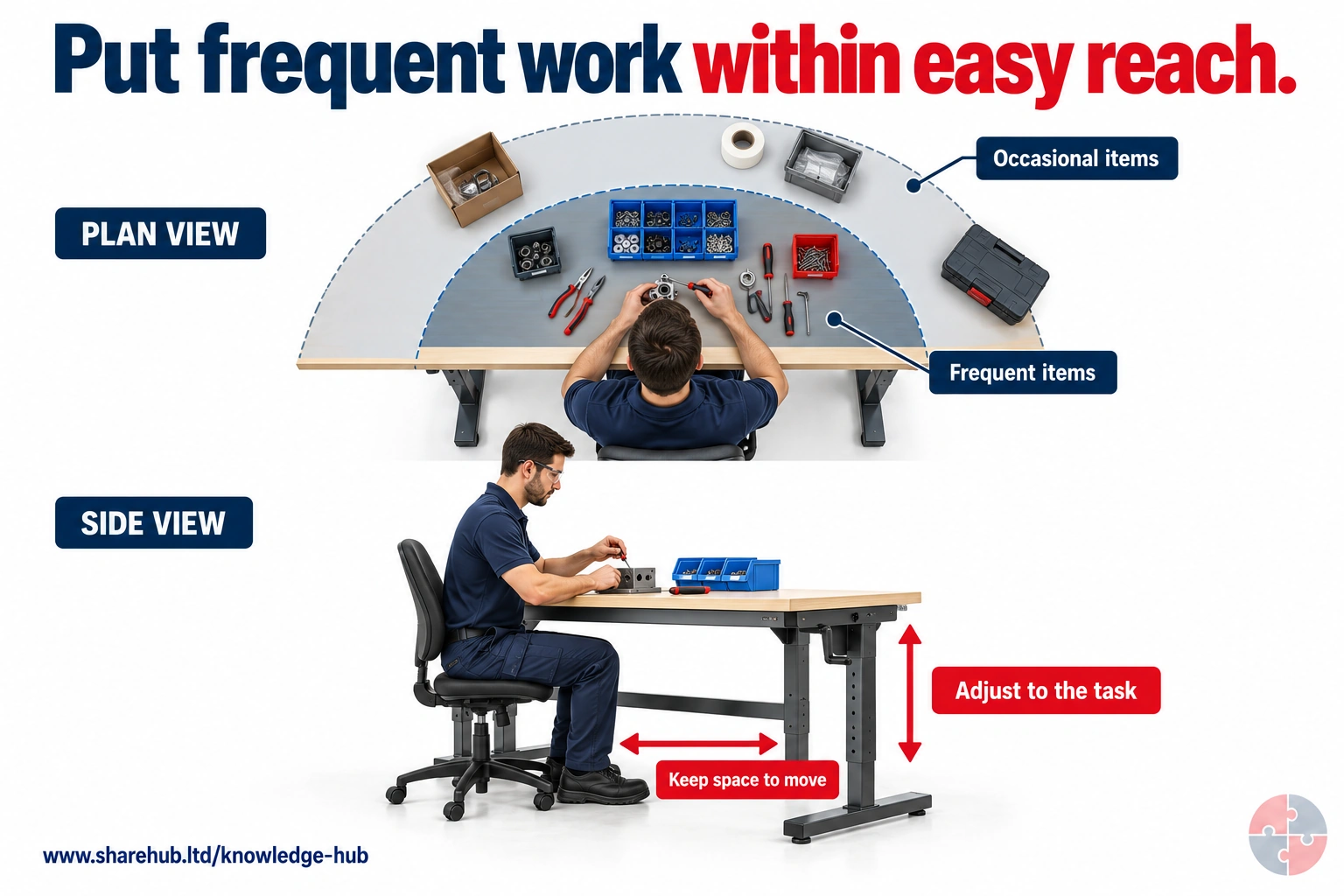
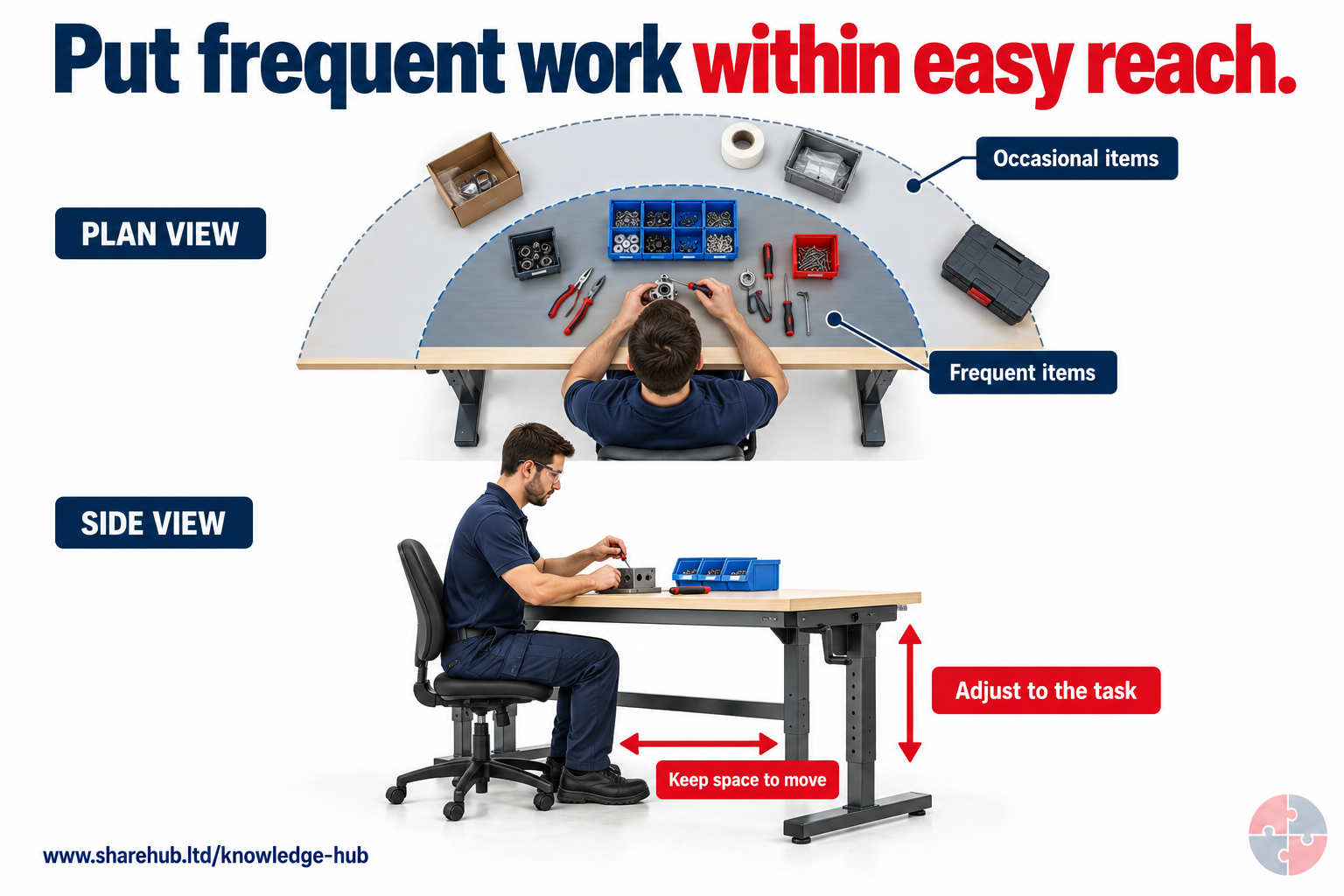
Place frequent items close, reserve farther positions for occasional use and adjust height to the task and person.
Why does item frequency matter?
A small unnecessary reach repeated throughout the task can increase cumulative demand.
Illustrative reach zones, not anthropometric limits or a universal workstation specification.
Source guidance: HSE HSG60
Trial adjustable height, jigs, fixtures, alternative tools or automated presentation before relying on posture reminders. Check seated and standing options, leg room, visibility, lighting and safe access. A dimension from GEIS4 is conveyor-specific guidance, not a universal desk or person measurement.
| Design choice | Risk removed | Verify |
|---|---|---|
| Adjust height | Less shoulder lift or stoop. | Several worker statures. |
| Jig or fixture | Less pinch force and static holding. | Task quality and safe release. |
| Move supply | Less repetitive reach. | Normal and peak cycle. |
| Improve light | Less leaning to see. | No glare or shadow. |
What makes a conveyor workstation unsafe for the upper limbs?
A belt that is too high, wide, fast or obstructed can force repeated reach, twisting, grip and poor recovery; redesign the presentation and pace for real workers.
GEIS4 gives conveyor-specific design considerations, including a repetitive reach zone within 450 mm of the operator's front. Treat this as design guidance for this setting, not a legal clearance or a safe limit for every task. For a jam, the worker holds the task, keeps hands out and calls an authorised maintainer. A normal stop does not verify a safe state. The maintainer uses the approved procedure for this machine to isolate and verify as required, clears the fault and restores guarding and function; the named equipment owner records release before the supervisor reviews presentation and pace.
| Fault | Control | Hold |
|---|---|---|
| Long reach | Move items closer or change belt width/presentation. | Cannot reach without leaning. |
| Pace too fast | Adjust flow or staffing. | Worker chases passing items. |
| Jam or blockage | Hold; authorised maintainer uses approved machine isolation and verification, then restores guards and function. | No reaching in; no restart before named release and task review. |
How should tools and materials be chosen?
Choose tools and materials that fit the task and users, reducing trigger or grip force, weight, wrist bend, contact pressure and vibration; trial them in real work before buying.
Consider left-handed use, glove effects, maintenance and workpiece support. A lighter tool that takes longer or requires a stronger grip may not reduce total risk. Where vibrating tools are used, assess hand-arm vibration separately.
Handle and trigger. Trial question: Can different users grip without forceful pinch?; Record: Worker trial.
Weight and support. Trial question: Can jig or balancer carry load?; Record: Task observation.
Workpiece. Trial question: Can it be held without static hand effort?; Record: Fixture test.
Can rotation and breaks solve poor task design?
Rotation and breaks support recovery only when the alternative task uses different muscles and demand; first remove or reduce force, repetition and awkward posture in the original work.
Moving a worker from one high-force or repetitive hand task to another does not create recovery. Check targets, staffing, overtime and whether breaks are genuinely taken without pace compensation. Consult workers on feasible variation and trial the schedule.
Rotate from packing to scanning. Test: Do both load the same arm and hand?; Stop: Do not credit false recovery.
Add a short break. Test: Does the work rate then rise?; Stop: Redesign pace.
Automate a step. Test: Does a new loading task create risk?; Stop: Reassess whole job.
Bench height is not always work height
Assess the height where the hands meet the work item, not only the belt or bench surface. A tall product, raised jig or fixture changes that effective height and the shoulder/reach demand. Trial the real product range with users, adjust the fixture or supply arrangement and reassess the task; do not impose one dimension for everyone.
What if a worker has symptoms or needs an adjustment?
Change the risk-producing task promptly, discuss practical temporary changes, and use occupational health or a clinician for clinical fitness, restrictions and return-to-work advice.
Do not require a worker to prove a diagnosis before assessing the task. Keep clinical details confidential and tell managers only what they need to implement safe restrictions. Review whether changes work for this person and other workers; no adjustment can guarantee recovery.
New discomfort. Work response: Reduce exposure and review task; Health owner: Worker chooses appropriate clinical route.
Existing condition or disability. Work response: Assess individual fit and adjustments; Health owner: OH or clinician advice as needed.
Return after absence. Work response: Agree phased or modified task if advised; Health owner: OH and manager; no self-certification by page.
What should be checked before work starts?
Confirm the task, user, layout, equipment condition, pace and recovery match the assessment; check that reporting and hold routes are understood.
For DSE, adjust the specific desk or portable setup. For bench or conveyor work, check height, reach, jig, tool, supply and safe machine state. A new material, user, line speed, chair or software workflow can invalidate the previous assessment.
Setup fits person. Evidence: Trial and adjustment check; Hold if: Unresolved discomfort or reach.
Equipment works. Evidence: Chair, input device, jig or tool condition; Hold if: Defect increases strain or acute hazard.
Plan allows recovery. Evidence: Real task variation and staffing; Hold if: Target defeats controls.
What should happen during use and at hand-back?
Watch actual force, reach, speed and comfort; pause and reassess changed work, then record defects, symptoms and completed design actions for the next user or shift.
A worker must be able to raise a problem without carrying on to meet output. Restore safe equipment only after a competent repair or reassessment. Keep individual health details in the confidential route and share necessary task restrictions only.
During. Action: Observe peak as well as routine cycles; Evidence: Worker feedback and supervisor check.
Change. Action: Hold and reassess new pace, tool or setup; Evidence: Updated action and owner.
Hand-back. Action: Clean and adjust shared station, report defects; Evidence: Next-user status.
The employer owns the adjustment decision
Use the GB Equality Act route or the separate NI Disability Discrimination Act route for the workplace. Clinical or OH functional advice informs the employer’s reasonable-adjustment decision; it does not transfer that decision to the clinician. Discuss the work barrier, agree practical actions and an owner, and review whether the change works.
When should the task stop or be held?
Hold work when a worker cannot use the setup comfortably, symptoms worsen, force or pace defeats controls, essential equipment is defective, or a machine task presents an immediate unsafe condition.
Move the worker to a genuinely lower-demand task where suitable, isolate a defective item by local procedure, and arrange assessor or clinical advice as needed. Do not restart from a form marked complete; verify the changed task with the worker and named owner. For sudden severe health events use the local urgent-response route.
| Trigger | Immediate action | Restart basis |
|---|---|---|
| Worsening pain, numbness or lost function | Stop or modify task; seek health advice. | Task and fitness advice where needed. |
| Broken chair, jig or tool | Remove from use and arrange repair. | Competent check and release. |
| Conveyor jam or exposed moving part | Stop safely; restrict access. | Authorised machine procedure. |
How should symptoms and defects be reported?
Make early reporting simple and non-punitive, record the work factors and action owner, review similar tasks, and give the worker a clear health-support route.
A symptom report is not a diagnosis and must not be circulated as general team data. HSE says general MSD health monitoring can be useful but is not itself a universal legal requirement. Look for clusters, changed work and whether controls have actually improved.
Task concern. Use: Fix layout, pace or force; Privacy: Share with work owner.
Symptom trend. Use: Identify clusters and review controls; Privacy: Aggregate where possible.
Clinical opinion. Use: Set appropriate work restrictions; Privacy: Restricted access.
Does every WRULD symptom need a RIDDOR report?
No. GB and NI have separate specified-disease rules; a responsible person checks a confirmed diagnosis, the linked work exposure and the applicable reporting route.
In GB, HSE says carpal tunnel syndrome associated only with typing or similar repetitive movement is not reportable under the listed carpal tunnel syndrome (CTS) category; regular hand-held percussive or vibrating tool work may be. Other listed disorders have their own exposure conditions. Record and control all credible symptoms even when Reporting of Injuries, Diseases and Dangerous Occurrences Regulations (RIDDOR) does not apply.
Pain without diagnosis. GB decision: Act on risk; not automatically a disease report; NI decision: Act on risk; check NI rules.
Clinician-diagnosed condition. GB decision: Match HSE specified disease and exposure; NI decision: Match HSENI and NI regulations.
Keyboard-only CTS. GB decision: Not GB CTS reportable category; NI decision: Do not import GB wording without NI check.
How do the controls change with the setting?
The same risk mechanism can appear in different tasks, but the route, equipment, people and competent owner change. Choose controls for the actual workplace and test them across shifts, contractors and non-routine work.
A generic checklist is a prompt, not evidence that the control works. Reassess after task, layout, vehicle, tool, staffing or work-pattern change.
| Setting | Credible risk | Specific control |
|---|---|---|
| Office or home DSE | Extended screen use and poor fit | Assess the actual user, screen, input devices, chair, breaks and home setup. |
| Conveyor or packing line | Fixed pace, reach and repetition | Change line height, reach and pace; observe several workers and shifts. |
| Manufacturing assembly | Forceful grip and precision repetition | Trial fixtures and tools; reduce force and verify output without added exposure. |
| Service or cleaning | Repeated trigger or awkward overhead reach | Choose suitable tools and methods; vary work and respond to early symptoms. |
What must each role demonstrate?
Match information, practice, supervision and authorisation to the decision and consequence of error. Course attendance alone does not show that a worker can identify a stop condition or that a specialist can verify a safe state.
Observe actual tasks, use scenario questions, document limits of authority and reassess after a significant change or unsafe event.
| Role | Demonstrated decision | Reassessment trigger |
|---|---|---|
| Worker | Describe task demand and symptoms early; try agreed safe adjustments. | Pain, tingling, tool or work-pattern change. |
| Supervisor | Observe real work, adjust pace and stop a task that worsens symptoms. | Repeated reports, new line speed or staffing change. |
| Designer, purchaser or assessor | Select task-specific DSE or repetitive-work assessment and verify redesigned work. | New tool, layout, user population or ART finding. |
| Occupational-health or clinical professional | Advise within clinical competence and privacy boundaries. | Persistent or worsening symptoms and individual support need. |
What information and competence are needed?
Teach workers to adjust their setup, recognise risk and report symptoms; train DSE assessors and task owners to evaluate the actual work and verify fixes.
The GB DSE Regulations require user information and training. A course certificate alone is not evidence that a workstation fits or an industrial task is controlled. Trial changes under supervision, check understanding and refresh after new equipment, methods or reported problems.
DSE user. Can demonstrate: Sets up station and reports problems; Limit: Does not approve own unresolved assessment.
Supervisor. Can demonstrate: Changes workload or holds task; Limit: Does not diagnose.
Assessor or designer. Can demonstrate: Observes, trials and verifies fit; Limit: Seeks specialist help beyond competence.
Which GB and Northern Ireland duties apply?
Use the law for the work location: GB and NI each have general health-and-safety, management and DSE instruments; manual-handling and disease-reporting duties apply only when their task and trigger conditions are met.
HSE says there is no single ULD-specific regulation. A legal row must not turn all upper-limb discomfort into a DSE, manual-handling or RIDDOR case. Product supply claims and voluntary standards do not replace the employer’s actual risk assessment.
Northern Ireland disease-reporting route
Use HSENI’s disease-case route and NI RIDDOR guidance to check the specified disease and work-exposure conditions, competent written diagnosis and responsible reporter. The employer or other responsible person makes the statutory report where required; a symptom report or a GB keyboard exception alone does not settle NI reportability.
How should management arrangements be checked?
Assign responsibility, assess the actual risk, implement controls, monitor whether they work and review after change or failure.
HSE’s Plan, Do, Check, Act guidance supports management review. It does not replace topic-specific law, technical assessment or competent sign-off.
How is ergonomic control effectiveness checked?
Compare the documented assessment with the real task, user feedback, symptom reports, defect closure, production demand and whether redesign reduced exposure.
Sample home, shared and non-DSE stations, including contractor and peak-rate work. Absence of formal claims is weak evidence when workers normalise discomfort. Recheck after new equipment, faster output, staffing change or a symptom cluster.
Assessment. Field question: Did the assessor observe work and close actions?; Escalate: Unresolved risk.
Design trial. Field question: Can users of different sizes work comfortably?; Escalate: Fit gap.
Work rate. Field question: Are breaks real without catch-up pressure?; Escalate: Target conflict.
Health signal. Field question: Are reports increasing or suppressed?; Escalate: Task and OH review.
How could BuildOut Ltd manage this in practice?

BuildOut Ltd would examine repetitive arm and hand work as a task-design issue, act on early reports and check whether improvements reduce the demands.
The operations manager owns pace and staffing, facilities owns workstation fit, the assessor checks DSE users and occupational health advises on individual restrictions. A low-cost chair adjustment is useful only if the task and recovery pattern also work.
Site office. BuildOut decision: Assess laptop, input and hybrid use; Evidence: DSE action closure.
Packing bench. BuildOut decision: Move items closer and adjust height; Evidence: Observed cycle and worker trial.
Maintenance. BuildOut decision: Support tool and workpiece; reduce grip force; Evidence: Task assessment and defect log.
Health response. BuildOut decision: Offer confidential advice and modified work; Evidence: Action and review, not diagnosis.
How do the controls work in real settings?
Eight BuildOut cases cover routine DSE, home work, hot desks, conveyor packing, cleaning, contractor tools, symptom response and an abnormal conveyor event.
Each case needs local task information, worker input, named decision ownership and competent health or machine-safety advice where relevant.
| Case | Hold point | Owner |
|---|---|---|
| Office user | Unresolved discomfort. | DSE assessor. |
| Home laptop | Unsupported sustained use. | Line manager. |
| Hot desk | Setup does not fit. | Facilities. |
| Packing line | Reach and pace. | Operations. |
| Cleaning | Trigger force and repetition. | Supervisor. |
| Contractor | Unverified task exposure. | Host and contractor. |
| Symptoms | Worsening or repeated reports. | Manager and OH. |
| Conveyor jam | Unsafe moving machine. | Authorised maintainer. |
Routine office DSE setup
Task material and setting: BuildOut daily screen task, not a posture or fitness certificate. The worker reports discomfort and the supervisor arranges a trained DSE assessor to assess the whole workstation, job, lighting and individual needs; adjust screen, chair, input reach and workable changes of activity, then trial during real work. Hold or modify sustained use if pain grows, equipment is defective or fit remains unresolved; offer confidential health advice as needed without a manager diagnosing. Record the assessment, provision, worker feedback and open actions; the named DSE assessor and supervisor check closure before routine use. If the same worker also packs or cleans, assess that non-DSE task separately with ART where suitable and a wider risk assessment; neither route replaces the other.
People and prerequisites: Office worker, trained DSE assessor and supervisor; fixed workstation, screen, chair and input devices.
Before: Confirm user scope; assess whole station and job, adjust chair, screen, pointer and light.
During: Vary activity and posture; report discomfort, glare or a failed adjustment.
Hold or stop: Hold prolonged use if pain rises or the setup cannot fit the worker.
Completion and hand back: Assessor resolves actions and checks user comfort in real work.
Evidence: DSE assessment, action owner, equipment provision and review.
Hybrid worker using a home laptop
Task material and setting: BuildOut hybrid DSE task, not approval of any laptop-only duration. The manager commissions a trained assessment of both home and office work, with the worker describing input, chair, light, privacy and real activity changes; the employer supplies required controls without passing the cost to the worker. Hold or change sustained work where the setup cannot support the actual task or symptoms rise, and seek competent or confidential health advice where needed. Record both assessments, equipment provision, worker trial and outstanding actions; the named manager and assessor accept the reviewed setup after worker feedback.
People and prerequisites: Hybrid worker and manager; home desk, portable computer and office workstation.
Before: Assess both locations, input needs, light, chair, privacy and work routine; provide required controls.
During: Use agreed setup and genuine activity changes; report new discomfort.
Hold or stop: Hold sustained unsuitable laptop-only use or unresolved home setup.
Completion and hand back: Check supplied equipment and review after changes in work pattern.
Evidence: Home and office assessments, equipment action and worker feedback.
Shared desk that does not fit the next user
Task material and setting: BuildOut shared DSE desk, not one fixed setup for all users. Facilities maintains an adjustable station and a trained assessor considers each user and job; each worker checks chair, feet, display, pointer and glare, then reports failed adjustments. Hold this desk for a user if a defective chair, missing support or adjustment range prevents a suitable setup; facilities provides an alternative, while clinical concerns go through a confidential route. Record the defect, alternative, individual DSE action and worker trial; the named facilities owner and assessor close the issue before that user returns.
People and prerequisites: Two workers of different stature, facilities and trained assessor; shared desk and chair.
Before: Confirm adjustment range, foot support, screen position and basic hot-desk instructions.
During: Each user makes the basic setup check; report equipment that cannot adjust.
Hold or stop: Hold the desk for a user when fit cannot be achieved or chair is defective.
Completion and hand back: Provide suitable alternative and document fix before handback.
Evidence: Shared-station assessment, defect and closure record.
Packing from a fast conveyor
Task material and setting: BuildOut non-DSE packing task, not a safe reach, pace or exposure limit. The operations lead and competent assessor observe normal and peak cycles with workers, use ART where suitable plus wider assessment, and trial closer guarded item presentation, adjustable height, support and a workable flow. Stop or redesign if workers chase items, reach across moving machinery, lose recovery or report increasing symptoms; a machine fault goes to authorised maintenance, never an operator hand-in-belt action. Record task observations, design trial, worker feedback and residual risk; the named operations owner releases only the reviewed task and pace.
People and prerequisites: Packing worker, operations lead and designer; belt, cartons and mixed item size.
Before: Observe peak cycle and worker sizes; assess reach, height, flow, grip and recovery.
During: Trial closer presentation, adjustable work height and realistic pace.
Hold or stop: Hold when workers must chase items, lean across moving belt or symptoms increase.
Completion and hand back: Verify reach and rate over full task; hand back only after user trial.
Evidence: ART/task review, GEIS4 design record, trial and action closure.
Repeated spray-trigger cleaning task
Task material and setting: BuildOut non-DSE cleaning round, not a universal trigger count. The supervisor and procurement lead observe actual force, repetitions, grip, posture, duration and recovery, use ART where suitable within a wider assessment, and trial a lower-force tool or different process with workers. Hold or change the round for a leaking or defective tool, numbness, rising pain or a plan that removes recovery; seek confidential health advice without supervisor diagnosis. Record the tool and task trial, worker feedback, actions and defects; the named supervisor accepts the controlled round before wider purchase.
People and prerequisites: Cleaner, supervisor and procurement lead; hand trigger and large route.
Before: Observe actual trigger count, grip, wrist posture, duration and available alternative methods.
During: Trial less forceful equipment or process and genuine task variation.
Hold or stop: Hold if pain, numbness, leaking tool or pressure to skip recovery emerges.
Completion and hand back: Review task and worker feedback before wider purchase.
Evidence: Task assessment, tool trial and symptom/action record.
Contractor brings an unfamiliar hand tool
Task material and setting: BuildOut contractor installation task, not permission to use a tool or ignore machine safety. Host and contractor leads agree the real method, tool condition, support, worker exposure, pace and task assessment, then trial lower-force or supported work with the operator. Hold for defects, unknown exposure, changed fixings, uncontrolled vibration or missing assessment; a competent equipment specialist handles faults, and symptoms use the confidential health route. Record the shared method, induction, trial, defects and residual actions; named host and contractor leads jointly hand back the controlled task.
People and prerequisites: Contractor worker, host supervisor and purchaser; hand tool, fixings and bench.
Before: Check task method, tool fit, workpiece support, prior exposure and who controls pace.
During: Use trialled method and report force or vibration differences.
Hold or stop: Hold if tool is defective, task demands change or assessment is missing.
Completion and hand back: Record contractor handback and defects; update shared plan.
Evidence: Method review, trial, induction and defect closure.
Several workers report hand pain after a line change
Task material and setting: BuildOut assembly symptom cluster, not a diagnosis or automatic RIDDOR decision. The manager promptly reduces force and pace or offers genuinely lower-demand work, consults workers and commissions a competent task redesign; occupational health or a clinician handles private health and fitness advice. Hold affected work for worsening symptoms, failed controls or an unsafe full-rate restart; check any GB or NI specified-disease reportability separately against diagnosis and exposure. Record anonymised trends, task assessment, trial, worker feedback and action owners, not public medical details; the named operations owner releases a reviewed rate with OH restrictions respected.
People and prerequisites: Line workers, manager, ergonomist and OH; faster assembly sequence.
Before: Record change, consult workers, reduce current demand and offer confidential health route.
During: Observe real pace, force and recovery; trial process redesign.
Hold or stop: Hold affected tasks or alter duties if symptoms worsen or controls fail.
Completion and hand back: Check worker feedback and trend before full-rate release.
Evidence: Change record, task assessment, OH advice boundary and review.
Unexpected conveyor jam during a packing run
Task material and setting: BuildOut conveyor blockage, not an isolation, lock-off or restart instruction. The worker stops the task safely, keeps hands out, warns the supervisor and calls an authorised maintainer; a normal control stop is not proof that stored or supplied energy is safe. Under the applicable GB or NI PUWER equipment duties, only a competent authorised maintainer follows the approved actual-machine procedure, isolates and verifies a safe state as that procedure requires, clears the fault and restores guarding and function. Hold access and production for uncertain energy, failed guards, repeat jams or missing competence; use the site emergency route for injury or immediate danger. The maintainer records fault, method, safe-state verification, repair and test; the supervisor reassesses reach, presentation and pace, and a named equipment owner releases the machine and task only after documented restoration and worker handback.
People and prerequisites: Packing worker, supervisor and authorised maintainer; stopped belt and trapped carton.
Before: Use local guarded stop/isolation procedure; keep hands out and call authorised help.
During: Maintainer clears by approved machine method; supervisor reassesses changed flow.
Hold or stop: No reaching into moving machinery or forced catch-up rate after restart.
Completion and hand back: Verify guards, function, item presentation and worker pace before handback.
Evidence: Fault, maintenance release, restart check and task review.
What do the acronyms and key terms mean?
Keep ULD, WRULD, MSD, RSI, DSE, ART and occupational-health advice distinct so a screening tool or symptom does not become a diagnosis.
| Term | Meaning | Boundary |
|---|---|---|
| ULD or WRULD | Upper-limb symptoms or disorders that work may cause or worsen. | Not one single diagnosis. |
| MSD | Wider musculoskeletal disorder. | Select correct body/task route. |
| RSI | Repetitive strain injury, a broad label. | Not proof of a specific condition. |
| DSE | Display screen equipment. | User scope and workstation rules apply. |
| ART | Assessment of Repetitive Tasks. | Not intended for DSE. |
| OH | Occupational health advice. | Clinical details confidential. |
| ULD and WRULD | Upper limb disorder and work-related upper limb disorder. | Work may cause or worsen a condition; do not infer diagnosis from symptoms. |
| RIDDOR | Reporting of Injuries, Diseases and Dangerous Occurrences Regulations; Great Britain and Northern Ireland have separate instruments. | A case is reportable only when the applicable criteria are met; seek the proper reporting decision. |
| CTS | Carpal tunnel syndrome. | A specific diagnosis needs clinical assessment; symptoms alone do not prove CTS. |
| HAV | Hand-arm vibration. | Assess the vibrating task and exposure separately from ordinary DSE posture. |
| PUWER | Provision and Use of Work Equipment Regulations; separate Great Britain 1998 and Northern Ireland 1999 instruments. | Equipment suitability and maintenance are separate from DSE or repetitive-task assessment. |
| HSE and HSENI | Health and Safety Executive for Great Britain and Health and Safety Executive for Northern Ireland. | Use the regulator guidance and legal route for the work location. |
| GP | General practitioner. | A clinical contact, not the owner of work design or a substitute for the employer risk assessment. |
| ERICPD | Eliminate, Reduce (including substitution), Isolate, Control, personal protective equipment, Discipline. | A SHARE decision prompt cross-mapped to HSE control guidance; it is not a separate legal standard. |
| PPE | Personal protective equipment. | Use for residual exposure after stronger practicable controls; it does not replace task design. |
Unlock another resource
You have used this month’s two free downloads. Publish a post in your own words to unlock one more resource, or choose SHARE Individual for 10 downloads per month.
You decide whether to share. If you do, use the relevant platform disclosure tools and do not make claims you do not genuinely hold.