SHARE Knowledge Hub
Posture and Movement
Posture and movement describe how work loads the body and how often that load changes. Sustained awkward positions, repetition, force, long reaches and insufficient recovery can contribute to musculoskeletal symptoms; one “perfect posture” cannot make a poorly designed task safe. Managers should assess the work, vary demands and adapt equipment and pace with the worker rather than diagnose a condition from posture alone.
Understanding Posture and Movement
Posture and movement describe how work loads the body and how often that load changes. Sustained awkward positions, repetition, force, long reaches and insufficient recovery can contribute to musculoskeletal symptoms; one “perfect posture” cannot make a poorly designed task safe. Managers should assess the work, vary demands and adapt equipment and pace with the worker rather than diagnose a condition from posture alone.
Why this matters at work
An aid should remove or reduce exposure without transferring the problem elsewhere. A lift table may reduce low picks but create a pinch hazard; a trolley may eliminate carrying yet demand high push force on a ramp. Suitability depends on capacity, stability, dimensions, route and how easily the aid can be used in the actual workflow. Workers may bypass an awkward aid even after training.
Health monitoring for MSDs can reveal whether controls are working, but it is not a replacement for reducing exposure. Body mapping and worker feedback can identify patterns across a group; they do not identify a medical cause in an individual. An occupational health professional can advise on fitness, restrictions and adaptations. The clinical record should remain under appropriate confidentiality arrangements.
How organisations manage this in practice
Set a measurable control claim before implementation, such as fewer floor picks or lower push force at a threshold. Observe the revised work, consult users and compare suitable assessment factors. Check maintenance and supervision arrangements. Where exposure has moved to another task or group, address the transfer. Keep the risk assessment open until field evidence supports the control, then schedule review after operational change.
A completed action is not the same as a reduced risk. A new trolley may remain unused, a height-adjustable table may be locked at one level, or a revised break schedule may be impossible under production targets. HSE tools are intended to identify and reduce risk factors; reassessment should show whether the relevant force, reach, repetition or duration changed.
Review screen, input devices, seating, work surface, environment, software and daily routine with the worker. Resolve doubtful points through a trained assessor and agree feasible corrections and useful task variation. Do not automatically grant every entitlement associated with one category to another or deny the employee solely because the desk is private. Record who supplies, installs and checks agreed equipment and review after substantial change or symptoms. A self-completed checklist is useful input, not evidence that unresolved issues were corrected. Individual clinical advice, disability adjustments and general safe task design remain related but separate considerations.
What should readers understand before using this page?
This page gives workplace guidance and signposting, not diagnosis, treatment or personal medical advice.
Posture and movement are often discussed too simply. Telling someone to 'sit up straight' or 'lift properly' does not fix a poorly designed job. Pain and discomfort can be affected by task design, workstation layout, repetition, force, recovery time, workload, stress, sleep, health conditions and confidence.
Managers should focus on the work impact: what task is difficult, what equipment or layout creates strain, what changes have occurred, what can be adjusted and when occupational health or medical advice is needed. They should not ask for unnecessary diagnosis detail or treat movement as a performance judgement.
HSE describes physical, work-organisation and psychosocial contributors to musculoskeletal disorders; employers should assess the work rather than infer a diagnosis. See HSE musculoskeletal disorders guidance. For confidential worker health information, see ICO workers’ health data guidance.
| Workplace can do | Workplace should avoid | Escalate or signpost when |
|---|---|---|
| Assess workstation, task, equipment, workload and breaks. | Diagnose pain or prescribe exercise. | Pain is severe, worsening, neurological or linked to safety-critical limitations. |
| Make reasonable adjustments and redesign tasks. | Tell people discomfort is just poor posture. | Symptoms persist despite work changes. |
| Provide DSE and manual handling information. | Collect unnecessary medical records. | Worker requests OH, GP or physiotherapy advice. |
What do posture and movement mean at work?
Posture and movement describe how the body is positioned, loaded and varied during work.
Best-practice guide: Posture and Movement

What do posture and movement mean at work?
Posture and movement describe how the body is positioned, loaded and varied during work. Posture and movement describe how work loads the body and how often that load changes.
Turn posture and movement knowledge into a decision
Posture and movement describe how work loads the body and how often that load changes. Sustained awkward positions, repetition, force, long reaches and insufficient recovery can contribute to musculoskeletal symptoms; one “perfect posture” cannot make a poorly designed task safe. Observed demands, trial dimensions, worker feedback, action closure and reassessment.
Operational example and hold points
Check reach and fatigue at normal throughput, including different users and task variation. Confirm usable layout and recovery pattern with workers; refer persistent symptoms for clinical or occupational-health support.
What work factors affect posture and movement?
Risk increases when awkward posture, force, repetition, duration, poor equipment and low recovery combine.
Choose controls for posture and movement
Eliminate: Eliminate: the operations lead asks whether the high-reach pick can be removed by changing stock placement or order flow. Reduce: Substitute and reduce: if the product must be picked, move frequent stock to a comfortable reach zone or use smaller, lighter containers. Isolate: Isolate and engineer: fit an adjustable lift or height-changing work surface where the layout permits, and place scans and labels inside normal reach. Control: Control, PPE and Discipline: vary tasks and schedule recovery opportunities based on actual work pattern, teach early reporting and review workload and symptom trends. Read the full control table for qualifications, ownership and verification. Use the actual task and applicable jurisdiction; existing technical approval remains unchanged.
Use the full posture and movement lesson
Use the full topic for the decision points, practical examples, detailed control tables and source scope. HSE guidance applies to Great Britain; use HSENI for the Northern Ireland route and the source’s stated jurisdiction. A simplified guide does not change the page’s technical-review or approval status.

Read all six steps as text
1. What do posture and movement mean at work?
Posture and movement describe how the body is positioned, loaded and varied during work.
- Avoid / redesign: Eliminate: the operations lead asks whether the high-reach pick can be removed by changing stock placement or order flow.
- Control the task: Isolate and engineer: fit an adjustable lift or height-changing work surface where the layout permits, and place scans and labels inside normal reach.
- Verify before release: Read the full task example, checks and stop points on this page.
Posture and movement describe how the body is positioned, loaded and varied during work. Posture and movement describe how work loads the body and how often that load changes.
Apply it: Which part of this plan would you check at the workface before authorising the task?
2. Turn posture and movement knowledge into a decision
Use the evidence to improve the actual work arrangement.
- Change at source: Eliminate: the operations lead asks whether the high-reach pick can be removed by changing stock placement or order flow.
- Make it observable: Read the full task example, checks and stop points on this page.
- Keep useful evidence: Observed demands, trial dimensions, worker feedback, action closure and reassessment.
Posture and movement describe how work loads the body and how often that load changes. Sustained awkward positions, repetition, force, long reaches and insufficient recovery can contribute to musculoskeletal symptoms; one “perfect posture” cannot make a poorly designed task safe. Observed demands, trial dimensions, worker feedback, action closure and reassessment.
Apply it: What evidence would show that the change improves this task, rather than only completing a record?
3. Operational example and hold points
Example: a practical application of the existing topic lesson.
- Setting: Distribution-centre high-shelf picking with repeated shoulder-height reaching.
- Act: Observe height, rate and worker variation; move frequent cartons lower and trial adjustable surface.
- Hold / review: Failed lift, painful reach or worsening symptoms; hold the route and use a safe alternative.
Check reach and fatigue at normal throughput, including different users and task variation. Confirm usable layout and recovery pattern with workers; refer persistent symptoms for clinical or occupational-health support.
Apply it: At which point would you hold this example, and what evidence would allow it to proceed?
4. What work factors affect posture and movement?
Connect the task, the route to the person and the control that can fail.
- Source / exposure: Risk increases when awkward posture, force, repetition, duration, poor equipment and low recovery combine.
- Possible consequence: A DSE issue might be a chair or screen problem, but it may also be workload, meeting patterns, laptop-only use, hot-desking or home furniture.
- Control failure: A manual task issue might be load weight, but it may also be reach, floor condition, handling height, frequency, team coordination or time pressure.
Risk increases when awkward posture, force, repetition, duration, poor equipment and low recovery combine.
Apply it: Who could be exposed, including other trades, cleaners, maintainers and people nearby?
5. Choose controls for posture and movement
Start with the stronger practicable options and verify their effect.
- Eliminate: Eliminate: the operations lead asks whether the high-reach pick can be removed by changing stock placement or order flow.
- Reduce: Substitute and reduce: if the product must be picked, move frequent stock to a comfortable reach zone or use smaller, lighter containers.
- Isolate: Isolate and engineer: fit an adjustable lift or height-changing work surface where the layout permits, and place scans and labels inside normal reach.
- Control: Control, PPE and Discipline: vary tasks and schedule recovery opportunities based on actual work pattern, teach early reporting and review workload and symptom trends.
Eliminate: Eliminate: the operations lead asks whether the high-reach pick can be removed by changing stock placement or order flow. Reduce: Substitute and reduce: if the product must be picked, move frequent stock to a comfortable reach zone or use smaller, lighter containers. Isolate: Isolate and engineer: fit an adjustable lift or height-changing work surface where the layout permits, and place scans and labels inside normal reach. Control: Control, PPE and Discipline: vary tasks and schedule recovery opportunities based on actual work pattern, teach early reporting and review workload and symptom trends. Read the full control table for qualifications, ownership and verification. Use the actual task and applicable jurisdiction; existing technical approval remains unchanged.
Apply it: Which stronger option can be used here, and who will verify it before accepting the remaining risk?
6. Use the full posture and movement lesson
Follow the official sources below and retain the task-specific evidence.
- Official guidance: HSE reducing awkward postures
- Official guidance: HSE display screen work routine
- Task decision: Observed demands, trial dimensions, worker feedback, action closure and reassessment.
Use the full topic for the decision points, practical examples, detailed control tables and source scope. HSE guidance applies to Great Britain; use HSENI for the Northern Ireland route and the source’s stated jurisdiction. A simplified guide does not change the page’s technical-review or approval status.
Apply it: Which official source and full-topic section will you use to resolve the next decision?
The central principle is variation. Sitting, standing, kneeling, reaching, twisting or gripping can all be tolerable for short periods, but risk increases when a posture is awkward, forceful, repeated, sustained or combined with poor recovery. Good design fits the work to the person instead of expecting the person to tolerate poor design.
Posture and movement apply to office work, home work, driving, production lines, retail, healthcare, construction, manual handling, tool use and mobile work. The same logic applies across settings: reduce unnecessary force, bring work within comfortable reach, avoid sustained static positions, match equipment to the user, build recovery into the task and act early on discomfort.
| Concept | Plain-English meaning | Workplace implication |
|---|---|---|
| Neutral range | A comfortable body position with less strain. | Set work height, reach and screen position sensibly. |
| Static posture | Holding one position for too long. | Use movement breaks and task variation. |
| Awkward posture | Bending, twisting, reaching or working at extremes. | Redesign layout and tools. |
| Repetition | Doing the same movement many times. | Use rotation, pace control and mechanical help. |
| Force | High grip, push, pull, lift or press effort. | Reduce load, friction, distance and resistance. |
| Recovery | Time for tissues to rest and adapt. | Build breaks and task variation into work. |
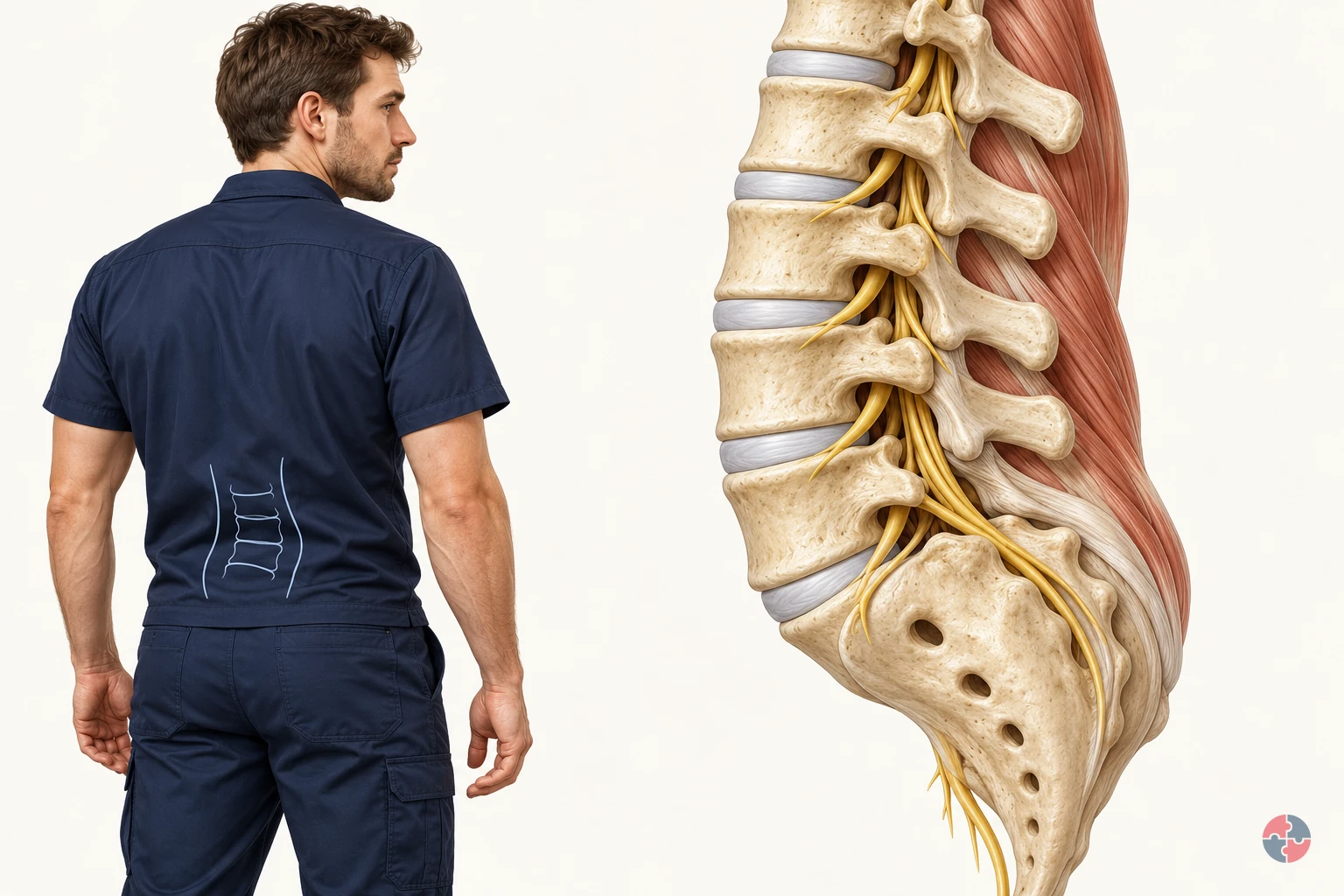
How does the back support movement, and how can work design reduce manual handling risk?
Interactive anatomy · Back and manual handling · Updated 2026-10-23
Read all anatomy and process explanations without the viewer
Simplified education, not a scan interpretation, diagnosis, safe-weight calculator, posture score or personalised exercise prescription. No webcam, posture capture or personal symptom input. Task demand comparisons never alter disc morphology or calculate spinal compression, tissue tolerance or injury probability.
Vertebral body
A vertebra is one of the bones of the spine. The vertebral body is the substantial front portion of a spinal bone. Neighbouring bodies are linked through discs, while other bony parts help enclose the nerve space behind them. Follow the bone-and-disc pattern to see how a spinal segment combines support with movement rather than behaving as a pile of separate blocks. University Hospitals Birmingham NHS Foundation Trust: Lumbar decompressive surgery: structure of the spine · DynamicHealth · NHS: Lower back pain
Intervertebral disc
A disc lies between neighbouring vertebral bodies. A disc is flexible tissue joining neighbouring vertebral bodies. A tougher outer region surrounds a softer centre, and the connected structure helps accommodate loading and movement. In the healthy model it stays part of the segment. The closer cutaway explains its regions; it is not a pressure gauge or a prediction of what a lift will do. University Hospitals Birmingham NHS Foundation Trust: Lumbar decompressive surgery: structure of the spine · DynamicHealth · NHS: Lower back pain
Outer disc region
The tougher outer region surrounds the softer centre. This labelled cross-section simplifies the disc’s tissue organisation. A ring outline is a teaching aid, not a measure of tissue strength. University Hospitals Birmingham NHS Foundation Trust: Lumbar decompressive surgery: structure of the spine
Inner disc region
The softer centre works with the outer disc tissue. Both regions contribute during loading. The diagram does not behave as a water balloon or show a pressure gauge. University Hospitals Birmingham NHS Foundation Trust: Lumbar decompressive surgery: structure of the spine
Facet joint
Small paired joints link neighbouring vertebrae. They contribute to stability and help guide movement at the back of the spine. Partner surfaces remain together during the normal movement example. The Dudley Group NHS Foundation Trust: Facet joint injections and medial branch block
Ligament
A ligament connects bones. Spinal ligaments help guide and restrain movement. They are a different tissue connection from a tendon. NHS: Sprains and strains · University Hospitals Birmingham NHS Foundation Trust: Lumbar decompressive surgery: structure of the spine
Supporting muscle
Back and trunk muscles help produce and control movement. Muscle fibres generate force and change length as they produce or control movement. Their pull is transmitted through tendon attachments to bone. Back, trunk and hip muscles contribute together during everyday bending and reaching. The highlighted muscle simplifies one part of that system, allowing you to follow a connection rather than calculate the effort of every muscle. DynamicHealth · NHS: Lower back pain · NHS: Tendonitis · York and Scarborough Teaching Hospitals NHS Foundation Trust: Treating a soft tissue injury: normal soft-tissue roles
Tendon attachment
A tendon transmits a muscle’s pull to bone. A tendon provides the connection through which muscle pull reaches bone. Trace it from the muscle into the attachment, then compare it with a ligament, which connects bones. The two connections contribute different functions. Keeping the attachment visible helps explain how a muscle can move or steady a joint without the tendon becoming a separate loose cord. NHS: Tendonitis · DynamicHealth · NHS: Lower back pain
Nerve root
Nerve roots leave the canal through side openings. A nerve root passes out beside the spinal bones towards the areas it supplies. Pressure or nearby inflammation can irritate it, sometimes producing symptoms in the buttock, leg or foot. The highlighted pathway explains this possible relationship, but symptoms vary. A coloured region cannot identify the cause of somebody’s pain or establish that a particular disc is responsible. University Hospitals Birmingham NHS Foundation Trust: Lumbar decompressive surgery: structure of the spine · NHS: Slipped disc · NHS: Sciatica · Norfolk & Waveney Community Musculoskeletal Services · NHS: Sciatica: understanding nerve irritation and protective muscle activity · Bradford Teaching Hospitals NHS Foundation Trust: Pain management: nerve root pain
Lower spinal canal
The lower lumbar canal contains a bundle of nerve roots. Below the end of the spinal cord these roots continue as the cauda equina. A solid spinal cord should not extend through this lower-lumbar illustration. University Hospitals Birmingham NHS Foundation Trust: Lumbar decompressive surgery: structure of the spine
Open the complete process transcript
The process, step by step
1 · Share support
Each vertebra works with the discs and other tissues around it to support the trunk while allowing movement. The disc between two vertebral bodies is flexible tissue, with a tougher outer region surrounding a softer centre. It helps the connected segment accommodate loading; it is not a loose pad that normally slides out when someone bends. Follow the repeating bone-and-disc arrangement, then look behind it towards the joints and nerve space. This relationship explains how support, movement and protection can coexist in the same part of the back. University Hospitals Birmingham NHS Foundation Trust: Lumbar decompressive surgery: structure of the spine · DynamicHealth · NHS: Lower back pain
What to watch: Follow two neighbouring vertebral bodies, the disc between them and the protected nerve space behind the bones in the lumbar view.
Why it matters: Support is shared across connected tissues rather than supplied by a single bone or disc. This arrangement allows the back to bear everyday demands while retaining the flexibility needed to change position.
Explore this step: Pause the model and locate the disc between two bones before selecting the next step.
2 · Allow movement
Movement of the back is spread across connected spinal segments and the rest of the body. The paired facet joints at the back of neighbouring vertebrae help guide movement, while ligaments connect bones and contribute to stability. In this step, the small illustrative movement helps you locate these relationships; it does not show a strain or a ligament being torn. Ordinary bending is part of normal function. Notice how a joint and a ligament perform different jobs, and avoid interpreting one demonstrated position as a universal safe or unsafe posture. University Hospitals Birmingham NHS Foundation Trust: Lumbar decompressive surgery: structure of the spine · The Dudley Group NHS Foundation Trust: Facet joint injections and medial branch block · Cambridge University Hospitals NHS Foundation Trust: Myth busting about posture, core stability and lifting
What to watch: Look behind the vertebral bodies for the paired facet joints, then follow the ligament between its bony attachment points.
Why it matters: Joints permit and guide movement; ligaments contribute restraint and stability. Together with the other spinal tissues, they allow controlled movement without making the back a rigid column or ordinary bending an injury.
Explore this step: Compare the joint and ligament labels and describe the different connection each one makes.
3 · Produce and control force
Muscle fibres produce force and can shorten or lengthen as they move or control the body. Their pull reaches bone through tendon attachments. Follow that continuous connection from the larger muscle region into the narrower tendon and its attachment, rather than treating muscle, tendon and bone as separate objects. Back, trunk and hip muscles contribute together during bending, turning and reaching. The model simplifies one part of this system so that the connection is easier to follow. Its movement is an explanation of function, not a measurement of an individual muscle’s effort or strength. DynamicHealth · NHS: Lower back pain · NHS: Tendonitis · York and Scarborough Teaching Hospitals NHS Foundation Trust: Treating a soft tissue injury: normal soft-tissue roles
What to watch: Follow the supporting muscle into its tendon and then to the bone, using the close view to keep the attachment visible.
Why it matters: This continuous attachment allows a muscle’s pull to move or steady the skeleton. Controlling a movement can involve muscle work as well as starting it; the visible motion does not account for every contributing muscle.
Explore this step: Trace the connection in both directions, then explain how a tendon differs from a ligament.
4 · Review the task
Normal back function takes place within a whole task, not an isolated spinal joint. Use the task view to compare a nearer reach with a more distant one. The load, how often it is handled, the working height, available space and the person’s capability all matter when assessing unavoidable handling. Repeated work is a separate factor from the reach shown in one still position. This comparison directs attention to work design; it does not calculate spinal force, identify a tissue injury or establish a safe load for everyone. HSE: Back pain at work · HSE: Assess manual handling you cannot avoid
What to watch: Compare the position of the person and the load in the closer and farther reach, including the surrounding working space.
Why it matters: The same body may face different demands when the task layout changes. Looking at reach alongside load, frequency, space and capability helps explain why an anatomy view alone cannot establish whether handling is suitable.
Explore this step: Compare both arrangements and name one task factor the model cannot measure for your workplace.
5 · Compare an example
Use the healthy segment as a reference before exploring an independent tissue example. A muscle strain concerns muscle tissue, a sprain concerns a ligament, and a disc example concerns a different structure again. These are separate explanations, not consecutive stages that every back passes through during a lift. Back pain can have several contributors, and the location or intensity of pain does not identify a damaged tissue by itself. Keep the normal view available so you can compare the selected structure without assuming that a pictured mechanism diagnoses a person or predicts what a task will do. NHS: Sprains and strains · NHS: Slipped disc · NHS: Back pain
What to watch: Locate the muscle, ligament, disc and nearby nerve root in the healthy reference before opening any separate tissue example.
Why it matters: Separating the tissues prevents a misleading story in which normal movement automatically becomes a specific injury. A model can explain a possible mechanism while leaving an individual’s symptoms and cause to proper assessment.
Explore this step: Choose one tissue example, identify the structure involved, and return to the healthy reference for comparison.
Worked handling examples
Bending to lower a load
A worker lowers a held box towards a low receiving surface. The low destination and repeated handling make the arrangement worth reviewing.
Check the receiving height, reach, grip, load and number of moves, including whether a handling aid can remove the repeated low placement.
Inspect the low destination The box starts in the worker’s hands, with a low receiving point ahead. Notice the standing space, the handhold and the distance to the destination. HSE: Assess manual handling you cannot avoid
Bend and lower the box The worker bends forwards and lowers the box. Watch the trunk and hips move together while supporting muscles control the descent. Muscle fibres change length and transmit pull through their tendon attachments. HSE: Back pain at work · NHS: Tendonitis · Cambridge University Hospitals NHS Foundation Trust: Myth busting about posture, core stability and lifting · York and Scarborough Teaching Hospitals NHS Foundation Trust: Treating a soft tissue injury: normal soft-tissue roles
Inspect the supporting muscles Follow the muscle fibres into their tendon attachments. Fibres change length while producing or controlling movement; the tendons transmit their pull to bone. Use Spine and attachments to locate these connections around the lumbar segment. NHS: Sprains and strains · NHS: Tendonitis · Cambridge University Hospitals NHS Foundation Trust: Myth busting about posture, core stability and lifting · York and Scarborough Teaching Hospitals NHS Foundation Trust: Treating a soft tissue injury: normal soft-tissue roles
Raise the receiving point and reduce handling Compare a receiving point closer to a practical working height. Before relying on a handling instruction, consider a suitable lift table, a different delivery arrangement or removing the handling step. HSE: Manual handling at work · HSE: Manual handling: reduce the risk of injury
Compare raised placement Provide a suitable raised receiving surface within easy access, and check whether a handling aid or process change can remove the repeated low placement. Confirm that the revised arrangement works with the team. HSE: Manual handling at work · HSE: Assess manual handling you cannot avoid · HSE: Manual handling: reduce the risk of injury
Ordinary bending is part of normal movement. This composite task does not identify a pain source, assign a safe posture or predict injury.
Turning while holding a load
A worker transfers a box to a surface at the side. The original layout invites a turn through the trunk while the feet remain facing the first surface.
Review transfer direction, foot space, the load and the pace of work so people have room to reposition while controlling the box.
Spot the sideways destination The destination is offset from the starting position. Before moving, check that the turning route is clear and the load will not hide obstacles. HSE: Assess manual handling you cannot avoid · HSE: Manual handling: good handling technique
Watch the loaded turn Compare the feet, pelvis and shoulders as the worker turns with the box. Supporting muscles change their pull to control the turn, while ligaments guide and restrain movement between neighbouring bones. HSE: Back pain at work · University Hospitals Birmingham NHS Foundation Trust: Lumbar decompressive surgery: structure of the spine · HSE: Manual handling: good handling technique · York and Scarborough Teaching Hospitals NHS Foundation Trust: Treating a soft tissue injury: normal soft-tissue roles
Inspect the ligament connection Open Ligament close-up to identify the bone-to-bone connection. Use Spine and joints to see how neighbouring structures support and guide normal movement. NHS: Sprains and strains · University Hospitals Birmingham NHS Foundation Trust: Lumbar decompressive surgery: structure of the spine
Make room to turn with the load Compare a clearer transfer arrangement that lets the worker reposition the feet towards the destination. Review the layout first; a turning instruction cannot create missing floor space. HSE: Manual handling: good handling technique · HSE: Manual handling: reduce the risk of injury
Compare repositioned turn Clear the turning area and bring the receiving position into a better alignment. Where a turn remains, provide space to move the feet with the load; consider a suitable transfer aid for repeated moves. HSE: Manual handling: good handling technique · HSE: Manual handling: reduce the risk of injury
This is a selected work example and a separate possible sprain illustration. The model cannot decide whether a particular turn is harmful or diagnose symptoms.
Reaching to place a load
A worker places a box towards the back of a shelf. The shelf depth keeps the load away from the body during the final part of the placement.
Check shelf depth, placement height, access from the other side, grip and repetition instead of assessing the box by weight alone.
Identify the placement point The destination is set behind the accessible shelf edge. Notice the space in front of the shelf and the reach needed while the box is still supported by the hands. HSE: Assess manual handling you cannot avoid
Watch the load move away The box moves farther from the body as the worker reaches. Watch the trunk and arms extend while the supporting muscles control the load. The longer reach changes the task demand; the model does not calculate tissue force. HSE: Back pain at work · HSE: Assess manual handling you cannot avoid · HSE: Manual handling: good handling technique
Inspect muscle fibres and the spine Inspect the muscle fibres as they change length and pull through their tendon attachments. Use Spine and attachments to see how these tissues connect around the lumbar segment. NHS: Sprains and strains · NHS: Tendonitis · NHS: Sciatica · York and Scarborough Teaching Hospitals NHS Foundation Trust: Treating a soft tissue injury: normal soft-tissue roles
Bring the receiving point within reach Compare a receiving point closer to the shelf edge. Consider changing the shelf or access, using a suitable aid, and setting the load down before making small position adjustments. HSE: Manual handling: good handling technique · HSE: Manual handling: reduce the risk of injury
Compare closer placement Move the receiving point nearer or redesign access so a long unsupported placement is unnecessary. Check suitable aids for the actual load and consider putting it down before the final position adjustment. HSE: Manual handling: good handling technique · HSE: Manual handling: reduce the risk of injury
Reach and load position are task factors, not a diagnosis. The colour and fibre motion identify a teaching region, rather than a measured injury from this placement.
Read the practice situations and all answer explanations
Sources and how the model is made
The opening images are AI-generated anatomical illustrations. The interactive 3D models and labelled SVG diagrams use original procedural artwork. These teaching images are not medical scans or diagnostic tools. Source references support the learner explanations and do not grant artwork rights.
- HSE: Manual handling at work — Avoid hazardous handling where practicable, assess unavoidable tasks and reduce risk; there is no universal weight limit.
- HSE: Back pain at work — Work design, repetition/reach, handling aids, consultation and early reporting.
- NHS: Sprains and strains — Muscle strain versus ligament sprain, local pain/tenderness and possible involuntary painful muscle tightening (spasm); no treatment programme copied.
- NHS: Slipped disc — Outward disc protrusion, possible nerve involvement and absence of symptoms in some people; the animation is not a diagnosis.
- NHS: Back pain — Often uncertain cause, possible muscle spasm, routine versus urgent assessment and emergency warning signs.
- University Hospitals Birmingham NHS Foundation Trust: Lumbar decompressive surgery: structure of the spine — Basic vertebral/disc/ligament anatomy, nerve roots and cauda equina only. Source illustrations and surgery instructions are not copied.
- DynamicHealth · NHS: Lower back pain — Lumbar support, discs, ligaments, tendon attachments and varied movement context.
- The Dudley Group NHS Foundation Trust: Facet joint injections and medial branch block — Only the normal role of paired facet joints in stability and guiding movement; no injection advice.
- NHS: Tendonitis — Tendons connect muscle to bone; no medication or treatment prescription reused.
- HSE: Manual handling: training — Training supports work design and does not ensure safe handling on its own.
- HSE: Assess manual handling you cannot avoid — Assessment of task, load, frequency, working environment and individual capability.
- Cambridge University Hospitals NHS Foundation Trust: Myth busting about posture, core stability and lifting — Avoid fear-based posture claims and a single ideal posture; no personalised exercise advice.
- NHS: Sciatica — Nerve irritation/compression, possible symptoms in the buttock and one leg or foot, variable symptom onset, when to obtain advice and emergency warning signs. No treatment programme or diagnostic distribution is copied.
- Norfolk & Waveney Community Musculoskeletal Services · NHS: Sciatica: understanding nerve irritation and protective muscle activity — Pressure and local inflammation as possible routes to nerve irritation; protective muscle activity and possible cramp; connected discs do not slip out as loose objects. No copied artwork, exercise or treatment programme.
- Bradford Teaching Hospitals NHS Foundation Trust: Pain management: nerve root pain — Disc bulges may irritate or compress nerve roots, with symptoms in supplied leg/foot regions. Only explanatory anatomy and symptom context, not clinical management or a diagnostic nerve map.
- HSE: Manual handling: good handling technique — Practical planning, load position, foot movement during turning, and setting down before final adjustment. Technique supports task redesign and suitable aids; no universal posture or safe load is inferred.
- HSE: Manual handling: reduce the risk of injury — Task-specific mechanical help and changes to load, height, layout, space and work routine for unavoidable handling. Original worked examples are not HSE-tested tasks.
- York and Scarborough Teaching Hospitals NHS Foundation Trust: Treating a soft tissue injury: normal soft-tissue roles — Basic anatomy only: muscle fibres contract and lengthen to produce or control movement, tendons connect muscle to bone, and ligaments connect bones. Paediatric treatment advice, recovery times and artwork are not reused.
- Bexley Musculoskeletal Service · NHS: Acute low back pain — Low-back pain may also be felt in the buttocks and thighs; pain intensity or location does not establish a specific tissue injury. No treatment programme, exercise, fixed recovery estimate or diagnostic rule is reused.
Power-zone explorer: what the colours mean
Choose Explore the 3D power zone in the handling examples. Move the load using the height, reach, side-position and mass controls. The floor target connects the feet to the load position; the translucent volume shows a close-in handling zone for this illustrative worker. Red highlights and matching text identify areas with added demand as the arrangement changes.
The display is a task-design illustration. It does not calculate tissue forces, identify damaged structures, predict pain or injury, or recommend a safe lifting weight. Actual handling needs assessment of the task, individual, load, environment and other factors, including repetition and recovery. Consider avoiding the handling or using suitable aids before relying on lifting technique.
HSE: good handling technique · HSE: control measures for lifting tasks
How can the hierarchy of controls reduce awkward postures and static or repetitive work?
Consider a warehouse packer repeatedly reaching above shoulder height for cartons while scanning orders. The source is a high shelf and repetitive reach; tissue load builds at the shoulder and neck, while fatigue can make the reach less controlled. Eliminate, Reduce, Isolate, Control, personal protective equipment (PPE) and Discipline (ERICPD) helps compare actions with the five-level hierarchy of elimination, substitution, engineering, administrative controls and PPE. Posture is part of the task design, not a diagnosis of the worker.
Eliminate: the operations lead asks whether the high-reach pick can be removed by changing stock placement or order flow. Test the new layout against stock frequency and congestion; moving the burden to another worker is not elimination. Record reach observations and worker feedback before and after the change.
Substitute and reduce: if the product must be picked, move frequent stock to a comfortable reach zone or use smaller, lighter containers. The buyer and supervisor check packaging stability and total handling time. A lighter package can still cause harm if repetition rises sharply, so observe real throughput and recovery.
Isolate and engineer: fit an adjustable lift or height-changing work surface where the layout permits, and place scans and labels inside normal reach. A competent designer checks dimensions with users of different stature; maintenance checks movement and stability. A failed lift, blocked access or new awkward reach triggers a hold and task redesign.
Control, PPE and Discipline: vary tasks and schedule recovery opportunities based on actual work pattern, teach early reporting and review workload and symptom trends. HSE does not set one legal break duration for all display-screen users. Supervisors check whether the redesigned task reduces sustained reach; clothing or braces are not a substitute for changing the work. Escalate worsening pain, numbness or loss of function for appropriate assessment and adjustment.
Direct source: HSE reducing awkward postures
Direct source: HSE display screen work routine
Direct source: HSE hierarchy of controls
How can the ERICPD hierarchy of controls reduce awkward postures and static or repetitive work?

| ERICPD control level | Topic-specific example | Source and full task context |
|---|---|---|
| Eliminate | Remove unnecessary high-reaching or repeated manual handling through task/stock redesign. | Read the full task example, checks and stop points on this page. HSE reducing awkward postures · HSE display screen work routine · HSE hierarchy of controls |
| Reduce | Assess an actual lower-hazard handling/process replacement; breaks and task timing are administrative measures. | Read the full task example, checks and stop points on this page. HSE reducing awkward postures · HSE display screen work routine · HSE hierarchy of controls |
| Isolate | Provide adjustable lifting/work surfaces and suitable stock positions to reduce reach and force. | Read the full task example, checks and stop points on this page. HSE reducing awkward postures · HSE display screen work routine · HSE hierarchy of controls |
| Control | Plan meaningful task variation, recovery, instruction, workload and worker-led review across peak demand. | Read the full task example, checks and stop points on this page. HSE reducing awkward postures · HSE display screen work routine · HSE hierarchy of controls |
| PPE | PPE is not an effective primary solution to repetitive high reaching; do not invent a brace or posture-support control. | Read the full task example, checks and stop points on this page. HSE reducing awkward postures · HSE display screen work routine · HSE hierarchy of controls |
| Discipline | Observe different users and full-shift demands, act on reports and verify the redesign. | Read the full task example, checks and stop points on this page. HSE reducing awkward postures · HSE display screen work routine · HSE hierarchy of controls |
How can the ISO 45001 hierarchy of controls reduce awkward postures and static or repetitive work?

| ESEAP control level | Topic-specific example | Source and full task context |
|---|---|---|
| Elimination | Remove unnecessary high-reaching or repeated manual handling through task/stock redesign. | Read the full task example, checks and stop points on this page. HSE reducing awkward postures · HSE display screen work routine · HSE hierarchy of controls |
| Substitution | Assess an actual lower-hazard handling/process replacement; breaks and task timing are administrative measures. | Read the full task example, checks and stop points on this page. HSE reducing awkward postures · HSE display screen work routine · HSE hierarchy of controls |
| Engineering controls | Provide adjustable lifting/work surfaces and suitable stock positions to reduce reach and force. | Read the full task example, checks and stop points on this page. HSE reducing awkward postures · HSE display screen work routine · HSE hierarchy of controls |
| Administrative controls | Plan meaningful task variation, recovery, instruction, workload and worker-led review across peak demand. | Read the full task example, checks and stop points on this page. HSE reducing awkward postures · HSE display screen work routine · HSE hierarchy of controls |
| PPE | PPE is not an effective primary solution to repetitive high reaching; do not invent a brace or posture-support control. | Read the full task example, checks and stop points on this page. HSE reducing awkward postures · HSE display screen work routine · HSE hierarchy of controls |
Why is the best posture often the next posture?
The best posture is usually the next posture because the body tolerates movement and variation better than long static loading.
Posture advice is often reduced to a single ideal picture: straight back, shoulders relaxed, feet flat. That can be useful as a starting point, but it is not enough. A textbook posture held rigidly for hours can still create discomfort because muscles, joints, discs, tendons and nerves need variation, circulation and recovery. See HSE reducing awkward postures.
A better workplace message is: set up the work so comfortable posture is easy, then build in movement. For DSE this may mean alternating sitting and standing, changing tasks, walking during some calls and avoiding laptop-only work. For manual work it may mean moving materials into the primary reach zone, rotating tasks, using handling aids and reducing sustained kneeling, twisting or overhead work.
| Old message | Why it is incomplete | Better work-design message |
|---|---|---|
| Sit up straight. | A fixed position can still become static loading. | Set up the workstation well and vary position during the day. |
| Stand instead of sit. | Standing still can also create fatigue and discomfort. | Use sit-stand variation and task movement rather than one position. |
| Lift properly. | Technique does not fix excessive force, reach, frequency or poor storage height. | Redesign load, route, frequency, height and handling aids. |
| Take breaks if sore. | Late breaks after discomfort may be too slow. | Plan recovery and task variation before discomfort escalates. |
| Exercise outside work. | Personal activity helps wellbeing but does not excuse poor work design. | Improve work factors first, then signpost wellbeing support respectfully. |
What load and recovery model helps explain posture and movement?
Posture and movement risks are best understood as the balance between physical load, duration, repetition and recovery.
The body is built to move, adapt and recover. Problems arise when work repeatedly exceeds a person's current tolerance or gives too little recovery between similar loads. The issue may be a heavy lift, but it may also be a mouse used thousands of times, a driver sitting for long periods, a receptionist twisting to reach a printer, or a fitter kneeling and reaching overhead all day.
For learners, this model is more useful than the phrase 'bad posture'. It asks: what tissue or body area is loaded, how much force is involved, how often it happens, how long it is held, what recovery exists, and what work factors make it worse or better?
| Model element | What it means | Workplace example |
|---|---|---|
| Load | The physical demand placed on tissues through force, weight, grip or body position. | Heavy tool use, lifting from floor or sustained mouse grip. |
| Posture | The position of joints and body segments during the task. | Neck flexed over laptop or shoulder raised for overhead work. |
| Repetition | How often the same movement or force occurs. | Packing, scanning, typing, sanding or assembly work. |
| Duration | How long the posture or movement continues. | Long uninterrupted sitting, standing, driving or kneeling. |
| Recovery | Time and variation that allow tissues to settle and adapt. | Task rotation, microbreaks and changes in body position. |
| Psychosocial load | Demands, control, support and pressure that change how work is tolerated. | High targets causing people to skip breaks or ignore discomfort. |
| Individual tolerance | Capacity varies with health, sleep, pain, fatigue, disability and training. | Different workers need different adjustments for the same task. |
What work factors affect posture and movement?
Risk increases when awkward posture, force, repetition, duration, poor equipment and low recovery combine.
A DSE issue might be a chair or screen problem, but it may also be workload, meeting patterns, laptop-only use, hot-desking or home furniture. A manual task issue might be load weight, but it may also be reach, floor condition, handling height, frequency, team coordination or time pressure.
For a degree-level understanding, think of posture and movement as an interaction between the person, task, equipment, environment and organisation. The body responds to cumulative load. A small awkward movement repeated thousands of times or held for hours can matter as much as one heavy lift.
| Factor | Example | Control direction |
|---|---|---|
| Task height | Work too low or too high. | Adjust bench, chair, platform or tool. |
| Reach | Frequently reaching beyond comfortable zone. | Move materials closer or redesign layout. |
| Repetition | Keyboard, packing, scanning or assembly cycles. | Vary task, automate, rotate and pace properly. |
| Force | High grip on tool, stiff trolley or heavy load. | Improve tool design, maintenance and mechanical aids. |
| Duration | Long static sitting, standing or kneeling. | Break up the posture and vary work. |
| Environment | Cold, glare, vibration, poor lighting or cramped space. | Improve workplace conditions. |
| Psychosocial factors | High demands, low control or poor support. | Review workload, support and reporting culture. |
How should posture and movement risk be mapped?
A risk map helps assessors look beyond posture and identify the work-design factors that actually create musculoskeletal load.
At a low packing bench, repeated bending may combine with forceful lifting, pace and too little recovery. Observe a full work cycle and ask workers which reach or lift is hardest; then raise the stock or bench, reduce load and retest the task. A photograph of one posture cannot explain the whole exposure. GB source: HSE musculoskeletal disorders guidance
| Risk factor | What to look for | Work-design control |
|---|---|---|
| Force | High lift, grip, push, pull, pinch, press or tool reaction force. | Reduce load, improve handles, maintain wheels, use mechanical aids and reduce friction. |
| Repetition | Same movement repeated without variation or recovery. | Change sequence, rotate tasks, automate where suitable and adjust pace. |
| Static load | Sitting, standing, holding tools, gripping or maintaining posture for long periods. | Introduce movement, support, rests, task variation and adjustable equipment. |
| Reach | Work outside the comfortable zone, above shoulder height or far across a bench. | Bring work closer, change layout, raise/lower work or use platforms/fixtures. |
| Twisting and asymmetry | Turning while lifting, reaching sideways or working with one shoulder raised. | Reposition materials, improve access and redesign workflow. |
| Recovery time | No microbreaks, no task variation, high overtime or rapid repeated cycles. | Plan breaks, rotate demands and monitor workload. |
| Environment | Cold, vibration, poor lighting, tight spaces, glare, heat or unsuitable seating. | Improve conditions and equipment before expecting tolerance. |
| Psychosocial load | High demand, low control, poor support or fear of reporting pain. | Improve planning, support, worker voice and early-reporting culture. |
What should a movement variation plan include?
A movement variation plan should change the work pattern so people are not held in one posture or repeated movement for too long.
Rotation helps only if the next task changes the load on the same body parts. Pair screen work with movement, or alternate a repeated picking task with a genuinely different activity and planned recovery. Set an owner to check the rota in use; a timetable that workers cannot follow during peak demand is not a control. GB source: HSE display screen work routine
| Work pattern | Risk created | Practical intervention |
|---|---|---|
| Screen-heavy office work | Static sitting, shoulder load and visual fatigue. | DSE setup, activity changes, meeting gaps and microbreaks. |
| Standing reception or retail | Leg fatigue, back discomfort and limited recovery. | Sit-stand options, anti-fatigue matting, footwear review and task rotation. |
| Driving/mobile work | Static posture, whole-body vibration and limited toilet/break access. | Route breaks, seat adjustment, vehicle maintenance and recovery planning. |
| Production or packing | Repetition, reach and pace pressure. | Line redesign, rotation, reach reduction and pace review. |
| Manual handling | Force, twist, reach and poor load height. | Mechanical aids, layout change, load reduction and team handling. |
| Hybrid work | Multiple workstations and long video-call blocks. | Home/office DSE support, calendar hygiene and portable equipment. |
| Return after pain or absence | Capacity may be reduced and confidence affected. | Graded duties, review dates and OH/physio advice where needed. |
Choose the relevant official aid: DSE assessment for screen work; ART for repetitive upper-limb tasks; MAC for relevant lifting/carrying; and RAPP for pushing/pulling. These support competent task assessment and consultation, not diagnosis or a universal posture score.
How does posture and movement apply in different sectors?
Sector examples help readers see that posture and movement is a work-design topic across screens, vehicles, manual work, care, production and site tasks.
A screen worker may need a better workstation and task variation; a warehouse picker may need shelf changes or a lift table. Use the sector row to spot the likely load, then observe the actual task and choose a physical or scheduling change. Do not prescribe the same “better posture” message to both. GB source: HSE musculoskeletal disorders guidance
| Setting | Typical risk pattern | Better control |
|---|---|---|
| DSE and office work | Static sitting, poor screen height, mouse reach, laptop-only work and meeting overload. | DSE assessment, separate input devices, screen height, movement breaks and calendar gaps. |
| Warehouse and logistics | Picking from low/high locations, pallet wrapping, pushing cages and repetitive scanning. | Slotting redesign, lift tables, powered aids, route planning and task rotation. |
| Driving and mobile work | Long sitting, whole-body vibration, poor seat setup, limited breaks and awkward loading. | Seat adjustment, route breaks, vehicle maintenance, load aids and welfare planning. |
| Care and healthcare | Patient handling, awkward reaches, sustained standing and time pressure. | Handling aids, staffing, training, care planning, break cover and early reporting. |
| Manufacturing and assembly | Repetition, fixed workstations, grip force and line pace. | Adjustable fixtures, tool balancers, job rotation, pace review and ergonomic trials. |
| Construction and site work | Kneeling, overhead drilling, carrying materials, tool vibration and poor access. | Prefabrication, platforms, material staging, tool selection and task sequencing. |
| Retail and hospitality | Standing, reaching shelves, lifting deliveries, carrying trays and till work. | Work height, anti-fatigue controls, handling aids, rotation and break cover. |
How does DSE affect posture and movement?
DSE can create risk when workstation setup, screen use, input devices, work routine or breaks are poorly managed.
HSE guidance describes DSE workstation assessment duties for workers who use DSE daily for continuous periods of an hour or more as part of normal work. But the assessment is not only a checklist. It should lead to action where there are risks, especially after a new workstation, a new user, a change in work or reports of pain or discomfort. See HSE DSE workstation assessment.
The most common DSE failures are laptop-only work for long periods, poor screen height, unsupported forearms, excessive mouse reach, glare, awkward dual-screen use, poor chair adjustment and meeting patterns that prevent movement. Software self-assessments can help, but someone trained must review doubtful points and ensure problems are fixed.
| Issue | What it can cause | Better control |
|---|---|---|
| Laptop-only work | Neck flexion and awkward arms. | Separate keyboard/mouse and suitable screen height. |
| Poor screen position | Neck twisting or visual strain. | Screen central and comfortable viewing distance. |
| Mouse overreach | Shoulder and arm strain. | Mouse close, keyboard aligned and forearm supported. |
| No breaks | Static posture and fatigue. | Activity change and microbreaks. |
| Hot-desking | Workstation not adjusted to user. | Basic adjustment each time and shared equipment standard. |
| Home working | Unsuitable furniture or long hours. | Home DSE assessment and suitable equipment where needed. |
How does posture and movement apply to manual work?
Manual work creates risk when posture, force, load, frequency and recovery are poorly designed.
If a picker repeatedly takes stock from floor level, move high-use materials into an easier reach zone or use a pallet lifter before relying on lifting reminders. Check whether the redesigned task reduces bending and twisting over a whole shift, including replenishment and cleaning. GB source: HSE - Manual handling
| Task | Risk pattern | Design improvement |
|---|---|---|
| Picking from floor | Repeated bending and twisting. | Raise materials, use pallet lifter or redesign storage. |
| Overhead work | Shoulder load and neck extension. | Use access platform, tool extension or prefabrication. |
| Pushing/pulling | High force and poor grip. | Maintain wheels, reduce load and improve floor surface. |
| Tool use | Grip force, vibration, awkward wrist. | Select ergonomic tool and maintain sharpness/condition. |
| Production line | Repetition and pace pressure. | Rotate tasks, redesign reach and allow recovery. |
| Driving/mobile work | Static sitting and vibration. | Seat adjustment, breaks and route planning. |
Why is posture training not enough on its own?
Training helps people understand risk, but it cannot compensate for poor workstation layout, excessive force, unrealistic pace or lack of recovery.
Many organisations respond to discomfort by sending a posture leaflet or manual handling refresher. That may help awareness, but it does not fix a bench that is too low, a screen that is too high, a load stored at floor level, a trolley with poor wheels, a production target that prevents breaks, or a laptop-only setup used all day.
The stronger answer is to redesign the task first, then train people in the improved method. Training should explain why the controls matter, how to adjust equipment, when to report symptoms and how to escalate when the work cannot be done comfortably or safely.
| Problem | Weak training-only response | Better work-design response |
|---|---|---|
| Laptop neck pain | Tell worker to sit straighter. | Provide separate keyboard/mouse, raise screen and review meeting blocks. |
| Repeated shoulder reach | Tell worker to stretch. | Move materials into primary reach zone and adjust bench/line layout. |
| Manual handling strain | Repeat lifting technique training. | Reduce load, raise storage height and provide handling aids. |
| Tool grip discomfort | Tell worker to hold tool properly. | Select better tool, maintain sharpness and reduce force/repetition. |
| Standing fatigue | Tell worker to wear comfortable shoes. | Provide sit-stand option, matting, rotation and break cover. |
| Pain after return to work | Expect full duties immediately. | Use graded return, review dates and functional advice. |
Why does early reporting matter?
Early reporting allows the work to be adjusted before discomfort becomes persistent or disabling.
Workers often wait until pain is severe because they fear blame, capability concerns or being told to toughen up. A good culture does the opposite. It encourages early reporting, looks for work-design causes, makes practical adjustments and reviews whether the change helped.
Early action might be as simple as changing screen height, adjusting work pace, moving materials closer, repairing a trolley, adding a footrest, changing tool grip, rotating tasks or getting OH advice for complex symptoms. The earlier this happens, the easier it is to prevent escalation.
| Step | Action | Good evidence |
|---|---|---|
| Notice | Worker reports discomfort, fatigue or reduced tolerance. | Supportive conversation note. |
| Understand work impact | Ask what task, posture or movement is difficult. | Work-impact record, not unnecessary diagnosis. |
| Assess | Review workstation, task, equipment, environment and workload. | DSE/manual task assessment. |
| Adjust | Change layout, task, equipment, breaks or duties. | Adjustment action tracker. |
| Review | Check whether the change helped. | Review date and worker feedback. |
| Escalate | Seek OH/medical advice where needed. | Confidential referral and advice. |
How can a posture issue become a work-design issue?
A worked example shows why posture problems are often system problems.
A hybrid worker reports neck and shoulder pain. The old response is to email a generic posture leaflet. A better response is to review the actual work: laptop use at home, back-to-back video calls, no separate keyboard, glare, use of a sofa in the evening, high workload and no breaks. The solution is not one instruction; it is equipment, meeting design, workload review and movement breaks.
| Finding | Weak response | Better response |
|---|---|---|
| Laptop on kitchen table | Tell worker to sit up. | Provide separate keyboard/mouse and raise screen. |
| Back-to-back calls | Remind worker to take breaks. | Change meeting norms and build gaps. |
| Shoulder pain | Assume medical issue only. | Assess mouse reach, chair, desk and workload. |
| Home/office split | Assess office only. | Assess both work locations. |
| Review | No follow-up. | Check effect after adjustments. |
Operational example and hold points
Task material and setting: Distribution-centre high-shelf picking with repeated shoulder-height reaching.
People and prerequisites: Packer, supervisor, manager and ergonomics adviser; actual pick sequence and worker feedback are available.
Before: Observe height, rate and worker variation; move frequent cartons lower and trial adjustable surface.
During: Check reach and fatigue at normal throughput, including different users and task variation.
Hold or stop: Failed lift, painful reach or worsening symptoms; hold the route and use a safe alternative.
Completion and hand back: Confirm usable layout and recovery pattern with workers; refer persistent symptoms for clinical or occupational-health support.
Evidence: Observed demands, trial dimensions, worker feedback, action closure and reassessment.
What should managers do and avoid?
Managers should discuss work impact, adjust tasks and protect privacy.
Ask privately which task worsens discomfort and what change helps, without seeking unnecessary diagnosis details. Agree a temporary task or equipment adjustment, a responsible person and a review date; if symptoms persist, use an appropriate occupational-health route. A reminder to “sit straight” does not remove a fixed low bench or an overloaded rota. GB source: HSE musculoskeletal disorders guidance
| Theme | Do | Do not |
|---|---|---|
| Conversation | Ask what work activities are difficult. | Ask for unnecessary diagnosis detail. |
| Work design | Review task, equipment, breaks and workload. | Tell people to fix their posture without changing work. |
| Records | Record adjustments and work impact. | Store medical detail casually. |
| Support | Signpost to OH/GP where needed. | Give treatment or exercise prescriptions. |
| Performance | Consider temporary adjustments fairly. | Treat early reporting as weakness. |
| Review | Set a review date. | Make a one-off change and forget it. |
What should a manager check before blaming posture?
Managers should check whether the task can be redesigned before telling people to change behaviour.
Before attributing discomfort to behaviour, watch the work: is the bench fixed too low, are frequent items beyond reach, or does the pace prevent recovery? Change the height, layout or handling aid first, then check with the worker whether the new arrangement works during normal production. GB source: HSE reducing awkward postures
| Check | Question to ask | Example improvement |
|---|---|---|
| Work height | Is the work too low, too high or fixed for one body size? | Adjust bench, raise pallet, use platform or provide sit-stand option. |
| Reach | Are items outside the comfortable reach zone? | Move frequent items closer and remove twist/reach points. |
| Force | Is the load, grip, push, pull or tool force higher than needed? | Reduce weight, maintain wheels, sharpen tools or add powered assistance. |
| Frequency | Is the same movement repeated too often? | Rotate tasks, change sequence, automate or reduce pace pressure. |
| Duration | Is one posture held too long? | Plan microbreaks, recovery and varied duties. |
| Environment | Is lighting, heat, cold, vibration or space making posture worse? | Improve workplace conditions and access. |
| Reporting | Do workers feel safe to report discomfort early? | Use supportive conversations and no-blame reporting. |
| Review | Did the change work? | Set a review date and check worker feedback. |
Before/after observation record: note the task/body area, reach, force, repetition and duration at normal and peak demand; proposed change; worker feedback from different users; new hazards; owner and review date. Trial the actual shift pattern. One comfortable demonstration does not prove full-shift control. Record what changed and whether the same body area still carries the load in the next task.
What evidence shows posture and movement are managed well?
Evidence should show that assessments lead to practical changes and review.
Evidence should be read as a chain rather than a filing exercise. A single record rarely proves good management on its own; stronger assurance comes from matching records, observations, interviews, trends and verified action closure.
| Evidence | What good looks like | Weakness to challenge |
|---|---|---|
| DSE assessments | Completed for relevant users and reviewed after change or discomfort. | Checklist completed with no action. |
| Manual task assessments | Task, load, posture, frequency and environment reviewed. | Training relied on while task design stays poor. |
| Adjustment records | Work changes made and reviewed. | Informal changes with no review. |
| Early reporting data | Reports lead to action, not blame. | Discomfort ignored until absence. |
| Manager training | Managers know privacy and work-impact boundaries. | Managers ask intrusive health questions. |
| Worker feedback | Users confirm controls are practical. | Assessment done without worker input. |
Which workplace duties are relevant to posture and movement?
Posture and movement is managed through DSE, manual handling, welfare, risk assessment, equality and health-data duties.
The rows distinguish Great Britain and Northern Ireland. Choose the instrument for the work location and the actual equipment or task; a guidance page or voluntary standard does not replace legal text.
Health information collected during work adjustments needs a lawful basis, an appropriate special-category condition and confidential handling. See ICO workers’ health data guidance.
In Northern Ireland, disability-related workplace adjustments follow the Disability Discrimination Act 1995 as applied there, rather than the Great Britain Equality Act route. The duty depends on the individual circumstances; a posture symptom alone does not settle legal status. See Equality Commission Northern Ireland guidance.
| Duty or regulation | What it requires | How to apply it |
|---|---|---|
| Health and Safety at Work etc. Act 1974 | Requires employers to protect workers from work-related risks so far as reasonably practicable. | Focus on work design, welfare, fatigue, access, dignity, emergency needs and safe task allocation. |
| Management of Health and Safety at Work Regulations 1999 | Requires suitable risk assessment, preventive arrangements and review. | Assess work impacts without diagnosing medical conditions. |
| Equality Act 2010 | Protects workers from discrimination and may require reasonable adjustments. | Consider individual work impacts without stereotypes or intrusive questions. |
| Data Protection Act 2018 | Health information is special-category data. | Keep health information need-to-know, lawful, minimal and secure. |
| Health and Safety (Display Screen Equipment) Regulations (Northern Ireland) 1992 | Assess workstations and arrange appropriate work changes or breaks. | Use the Northern Ireland DSE instrument where the task meets its scope; do not import GB provisions without checking. |
| Health and Safety at Work (Northern Ireland) Order 1978 | Protect workers and others from work risks. | Assess work design, sustained loading and adjustments for the NI site. |
| Health and Safety (Display Screen Equipment) Regulations 1992 | Assess DSE workstations and arrange work changes or breaks where required. | Apply the GB DSE instrument to workers within its scope and act on the assessment. |
| Manual Handling Operations Regulations 1992 | Avoid hazardous manual handling where reasonably practicable; assess and reduce remaining risk. | Redesign lifts and carrying tasks before relying on handling instruction. |
| Manual Handling Operations Regulations (Northern Ireland) 1992 | Avoid hazardous manual handling where reasonably practicable; assess and reduce remaining risk. | Apply the NI instrument to lifting, carrying and pushing tasks. |
| Disability Discrimination Act 1995 (Northern Ireland application) | Northern Ireland disability-discrimination law includes reasonable-adjustment duties for qualifying disabled workers. | Assess work barriers and reasonable adjustments for the individual; do not treat every symptom as a legal disability. |
For an existing worker’s continuing-work adjustments, consult NI Disability Code of Practice: Employment and Occupation alongside the Commission’s supporting-employment guidance. The recruitment-only page remains useful for recruitment decisions.
How should the control be managed and reviewed?
For a GB workplace, HSE guidance supports identifying the actual risk, taking practical protective steps and reviewing whether they work. Name the decision owner, check the control during the real task and correct a failed arrangement. Apply the separate Northern Ireland duties and guidance where the work is in NI.
GB management guidance: HSE managing health and safety
What training and awareness helps?
Training should help workers and managers understand risk factors, not memorise a perfect posture.
Training should be role-based. General awareness creates a baseline, but supervisors, managers, advisers and senior leaders need different levels of decision-making, verification and escalation competence.
| Role | Demonstration | Assessor | Record and reassessment |
|---|---|---|---|
| Workers and new starters | Recognise awkward reach, repetition and early symptoms; report work factors. | Supervisor asks for a real task demonstration and reporting route. | Induction and change discussion; revisit if symptoms or task change. |
| DSE and manual-task users | Adjust the workstation or handling route and vary work within the task. | Assessor observes the user working at actual pace. | Individual assessment and action follow-up. |
| Supervisors | Spot high-load sequences, check recovery and redesign before blaming technique. | Manager reviews a live packing or DSE case. | Task observation and action closure. |
| Designers, managers and advisers | Specify reach zones, adjustable equipment and staffing; assess outcome with workers. | Competent ergonomics reviewer checks measures and field use. | Design rationale, worker feedback and reassessment after change. |
How could Riverside Leisure Ltd manage this in practice?

Riverside would manage posture and movement through DSE checks, manual task design, early reporting and inclusive adjustments.
A leisure business has reception staff using screens, instructors setting up equipment, maintenance staff handling plant and managers working from laptops. Riverside would assess each work pattern rather than issue one generic posture message.
| Management element | How the business would manage it | Evidence to review |
|---|---|---|
| Identify | Find DSE, manual and static-posture tasks. | Task inventory. |
| Assess | Review task, equipment, environment, workload and people needs. | DSE/manual assessment. |
| Adjust | Change layout, tools, breaks and duties. | Adjustment log. |
| Support | Train managers in early reporting and privacy. | Training records. |
| Review | Check pain reports, absence and worker feedback. | Wellbeing review. |
What do the acronyms and key terms mean?
Acronyms should be understood before they are used in assessments, briefings, audits or learning answers.
Acronyms can exclude newer readers if they are not explained. This section keeps the main terms available at the end of the page so the article stays readable while still supporting learners and audit users.
| Acronym | Meaning | Plain-English use |
|---|---|---|
| DSE | Display Screen Equipment | Screens and associated workstations. |
| MSD | Musculoskeletal Disorder | Injury or disorder affecting muscles, joints, tendons, ligaments, nerves or related tissues. |
| WRULD | Work-Related Upper Limb Disorder | Upper limb pain or disorder associated with work factors. |
| OH | Occupational Health | Work-health advice and fitness/adjustment support. |
| RAPP | Risk Assessment of Pushing and Pulling | HSE tool for pushing and pulling risk assessment. |
| ART | Assessment of Repetitive Tasks | HSE tool for repetitive upper limb tasks. |
Unlock another resource
You have used this month’s two free downloads. Publish a post in your own words to unlock one more resource, or choose SHARE Individual for 10 downloads per month.
You decide whether to share. If you do, use the relevant platform disclosure tools and do not make claims you do not genuinely hold.