Optional presentation practice. Choices and model launches do not write LMS grades, completion or certificates. This extension takes additional learning time.
1. DSE and workstation assessment Fit screen work to the person, the task and the locations actually used.
2. Choose a learning route 3. Understand the whole workstation Connect screen-work discomfort with equipment, task and environment.
Display screen equipment includes the devices used for screen-based work, rather than only a desktop monitor. The risk depends on the task, duration and arrangement. Static or awkward posture, repeated small movements and reaching can contribute to musculoskeletal discomfort.
Display screen equipment includes the devices used for screen-based work, rather than only a desktop monitor. The risk depends on the task, duration and arrangement. Static or awkward posture, repeated small movements and reaching can contribute to musculoskeletal discomfort. Glare, demanding close work and poor display settings can contribute to visual fatigue.
Look at the whole system: chair, desk, screen, keyboard, mouse, software, lighting, space and work demands. The worker’s experience is useful evidence, not proof of a particular diagnosis. Early discomfort should lead to reporting and assessment rather than an instruction to tolerate it. A larger screen cannot solve a workload that prevents changes of activity, just as a reminder cannot repair an unsuitable chair.
4. The fictional case and decision boundary Connect screen-work discomfort with equipment, task and environment.
Task and setting Fictional case: a booking adviser alternates between an office desk and a home laptop. The assessment form is complete, yet reaching, glare and uninterrupted calls continue. Decision to practise The office desk has an adjustable chair, but a printer forces the mouse far to one side. The user repeatedly reaches while handling customer bookings. Evidence to consider Recognise a setup that allows supported, varied work.
5. Decision 1: interpret the evidence The office desk has an adjustable chair, but a printer forces the mouse far to one side. The user repeatedly reaches while handling customer bookings.
Which improvement addresses the observed cause?
Raise the monitor alone and leave the repeated reach unchanged. Tell the adviser to hold one fixed posture throughout the shift. Rearrange equipment so normal input work is comfortably within reach, then check use. (supported response) The arrangement should reduce the actual reaching demand and permit variation, rather than demand tolerance of the layout.
6. Reconsider the evidence Which improvement addresses the observed cause?
Raise the monitor alone and leave the repeated reach unchanged. Tell the adviser to hold one fixed posture throughout the shift. Rearrange equipment so normal input work is comfortably within reach, then check use. (supported response) The arrangement should reduce the actual reaching demand and permit variation, rather than demand tolerance of the layout.
7. Decision 1 explained The arrangement should reduce the actual reaching demand and permit variation, rather than demand tolerance of the layout.
Recognise a setup that allows supported, varied work.
8. Arrange support and comfortable reach Recognise a setup that allows supported, varied work.
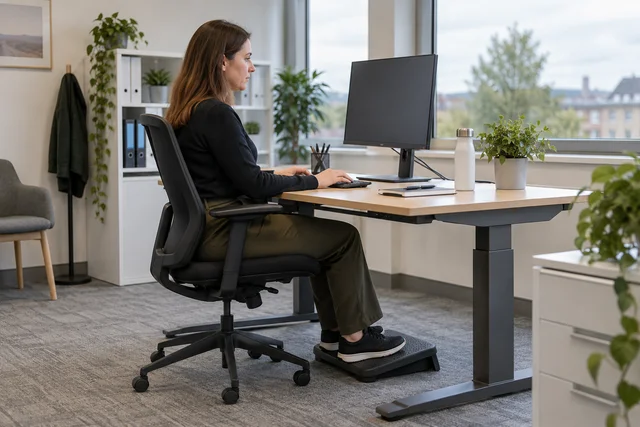
A workable arrangement lets the person use the screen and input devices without avoidable twisting or reaching. Adjust the chair for support and usable seat height, with feet supported on the floor or a suitable footrest. Provide room for the equipment and for changing position.
A workable arrangement lets the person use the screen and input devices without avoidable twisting or reaching. Adjust the chair for support and usable seat height, with feet supported on the floor or a suitable footrest. Provide room for the equipment and for changing position.
Keep the main screen in a suitable viewing position and the mouse close to the keyboard. Check glare and reflections as well as text size and contrast. These are starting questions for an assessment, not one rigid posture everyone must hold all day. A different task, user or visual need can require a different arrangement. Agree changes with the person, explain adjustments and check normal work afterwards; an attractive photograph of an empty desk cannot show whether the setup works in use.
9. Match the workstation clue Match each card to its meaning. Drag, or use the labelled category selector.
Match each card to its meaning. Drag, or use the labelled category selector.
The mouse is beyond comfortable reach — Reach and support. Look at layout and support during the task. A reflection obscures the display — Viewing and environment. Review screen and lighting arrangements. Calls prevent agreed activity changes — Work organisation. The workload must allow the planned variation. 10. Compare the reasoning: Match the workstation clue The mouse is beyond comfortable reach Reach and support A reflection obscures the display Viewing and environment Calls prevent agreed activity changes Work organisation
Match each card to its meaning. Drag, or use the labelled category selector.
The mouse is beyond comfortable reach — Reach and support. Look at layout and support during the task. A reflection obscures the display — Viewing and environment. Review screen and lighting arrangements. Calls prevent agreed activity changes — Work organisation. The workload must allow the planned variation. 11. Make prolonged laptop work workable Identify why a portable device can need additional equipment.
A laptop joins the screen and keyboard. Raising the screen can raise the hands; lowering the hands can leave the screen poorly positioned. For prolonged work, the page describes using a separate keyboard and mouse with a raised laptop screen or separate monitor as appropriate.
A laptop joins the screen and keyboard. Raising the screen can raise the hands; lowering the hands can leave the screen poorly positioned. For prolonged work, the page describes using a separate keyboard and mouse with a raised laptop screen or separate monitor as appropriate.
Match the equipment to the actual task and space rather than treating portability as an exemption. A tablet may be convenient for a short stock check but awkward for prolonged report writing. Avoid arrangements that require repeated typing on a lap, in a cramped vehicle or while walking. The user needs a practical way to reproduce the agreed setup, including power, desk space and storage. Supplying peripherals is useful only when the person can actually connect and use them where the work happens.
Open the related fictional model case
12. Decision 2: choose the response The adviser receives regular break reminders but the booking queue and performance targets allow no change of activity. The reminders are repeatedly dismissed during peak demand.
What needs improvement?
The workload and practical activity arrangement, not merely another reminder. (supported response) A louder reminder while keeping every conflicting demand. A rule that the worker is solely responsible for impossible breaks. A work pattern is effective only when task demands allow the intended recovery and variation.
13. Compare the consequences What needs improvement?
The workload and practical activity arrangement, not merely another reminder. (supported response) A louder reminder while keeping every conflicting demand. A rule that the worker is solely responsible for impossible breaks. A work pattern is effective only when task demands allow the intended recovery and variation.
14. Decision 2 explained A work pattern is effective only when task demands allow the intended recovery and variation.
Distinguish useful interruption from an unusable reminder.
15. Change the work pattern Distinguish useful interruption from an unusable reminder.
Prolonged screen work should be interrupted by breaks or suitable changes of activity. The purpose is to allow movement, posture variation and a rest from demanding visual or repetitive work.
Prolonged screen work should be interrupted by breaks or suitable changes of activity. The purpose is to allow movement, posture variation and a rest from demanding visual or repetitive work. The appropriate pattern depends on intensity, task and individual needs; this course supplies no universal timer.
Plan the work so the interruption can happen. Moving from data entry straight into another intensive screen task may not provide the intended variation. Short, frequent changes can be more useful than saving all recovery for one long interval. A reminder on the screen is not an effective arrangement if call targets or staffing make it impossible to respond. Discuss the real workload with the responsible supervisor and review whether the agreed pattern works during an ordinary busy period.
16. Select useful changes Choose every supported action. Leave the unsuitable actions unselected.
Choose every supported action. Leave the unsuitable actions unselected.
Make suitable peripherals usable in the home location — Supported action. The equipment must be available where prolonged work happens. Agree task variation that can occur during busy work — Supported action. A usable work pattern supports recovery. Close both setups using only an office photograph — Leave unselected. It does not establish normal use at either location. 17. Compare the reasoning: Select useful changes Make suitable peripherals usable in the home location Supported action Agree task variation that can occur during busy work Supported action Close both setups using only an office photograph Leave unselected
Choose every supported action. Leave the unsuitable actions unselected.
Make suitable peripherals usable in the home location — Supported action. The equipment must be available where prolonged work happens. Agree task variation that can occur during busy work — Supported action. A usable work pattern supports recovery. Close both setups using only an office photograph — Leave unselected. It does not establish normal use at either location. 18. Turn assessment into agreed action Identify reporting, assessment and follow-up roles.
A workstation assessment identifies difficulties, agrees improvements and checks the result. A self-assessment can reveal obvious issues, but unclear answers need review by someone able to help.
A workstation assessment identifies difficulties, agrees improvements and checks the result. A self-assessment can reveal obvious issues, but unclear answers need review by someone able to help. Record actions with an owner and a practical follow-up rather than closing the form as soon as it is returned.
Ask about the task and reported discomfort without demanding a diagnosis. Use the workplace route for persistent concerns or specialist advice. Explain how the worker can access the applicable eye and eyesight-test arrangements; a casual screen check is not a substitute for that route. Changes of workstation, equipment, work pattern or individual needs can require reassessment. The strongest evidence is that the agreed change is in place and useful during normal work, not merely that an order was raised.
Open the related fictional model case
19. Decision 3: apply and review The adviser’s office reach problem is corrected, but home use remains unchanged. The manager plans to close both locations using the favourable office follow-up alone.
Which conclusion fits the evidence?
The office result has no value until the home task is assessed. The office improvement is supported; the home arrangement still needs its own practical review. (supported response) Every location is resolved because one adjustment worked. Retain the useful scoped improvement without extending it to a different unexamined setup.
20. Revisit the control or support boundary Which conclusion fits the evidence?
The office result has no value until the home task is assessed. The office improvement is supported; the home arrangement still needs its own practical review. (supported response) Every location is resolved because one adjustment worked. Retain the useful scoped improvement without extending it to a different unexamined setup.
21. Decision 3 explained Retain the useful scoped improvement without extending it to a different unexamined setup.
Apply the same reasoning to hybrid work and changing needs.
22. Check every regular location Apply the same reasoning to hybrid work and changing needs.
Home and hybrid work need the same risk-management principles applied to the actual locations used. A good office setup does not establish the condition of a kitchen-table workstation, and advice that cannot be reproduced at home has limited practical value.
Home and hybrid work need the same risk-management principles applied to the actual locations used. A good office setup does not establish the condition of a kitchen-table workstation, and advice that cannot be reproduced at home has limited practical value. Establish what equipment and space are available.
Agree feasible adjustments, activity changes and a route for concerns. Respect personal circumstances and use appropriate support rather than relying on an intrusive inspection or assumptions about the home. Recheck after normal use, a task change or further discomfort. For the fictional transfer exercise, compare two work locations and identify one useful improvement at each. This develops assessment awareness; it does not certify you as a DSE assessor or replace occupational or clinical advice where needed.
23. Check the improvement Make a decision at each point and use the feedback before continuing.
Make a decision at each point and use the feedback before continuing.
Stage 1: What can the action record say? A user confirms the new office layout has reduced reaching.
The office adjustment works in the checked task. — Supported choice. Keep the conclusion within the evidence. All future discomfort is medically resolved. — Reconsider. A workplace follow-up cannot make that diagnosis. Every home setup is now accepted. — Reconsider. The home arrangement was not checked. Stage 2: What follows? The home laptop arrangement remains impractical.
Delete the remaining issue because the office action passed. — Reconsider. That hides an unresolved arrangement. Agree a feasible home improvement and follow-up through the assessment route. — Supported choice. Keep the remaining problem accountable. Tell the user to ignore the discomfort. — Reconsider. Concerns need appropriate review. 24. Compare the reasoning: Check the improvement What can the action record say? The office adjustment works in the checked task. What follows? Agree a feasible home improvement and follow-up through the assessment route.
Make a decision at each point and use the feedback before continuing.
Stage 1: What can the action record say? A user confirms the new office layout has reduced reaching.
The office adjustment works in the checked task. — Supported choice. Keep the conclusion within the evidence. All future discomfort is medically resolved. — Reconsider. A workplace follow-up cannot make that diagnosis. Every home setup is now accepted. — Reconsider. The home arrangement was not checked. Stage 2: What follows? The home laptop arrangement remains impractical.
Delete the remaining issue because the office action passed. — Reconsider. That hides an unresolved arrangement. Agree a feasible home improvement and follow-up through the assessment route. — Supported choice. Keep the remaining problem accountable. Tell the user to ignore the discomfort. — Reconsider. Concerns need appropriate review. 25. Apply the lesson in a fictional workplace An estimator works sideways on a laptop, with glare and little space for the mouse.
Apply the same reasoning to hybrid work and changing needs.
Open the related fictional model case
26. Take the learning into a fictional task Apply the same reasoning to hybrid work and changing needs.
Task and people Fictional case: a booking adviser alternates between an office desk and a home laptop. The assessment form is complete, yet reaching, glare and uninterrupted calls continue. Control or support Distinguish useful interruption from an unusable reminder. Check and review Apply the same reasoning to hybrid work and changing needs.
27. Explain your reasoning without the answer sheet Use the supplied case facts. Explain why a choice fits the task and what remains uncertain. A points total or completed form cannot replace the required control or support arrangement.
28. Office and home workstation assessment Assess the actual setup in each place. Use the illustrated checks and download separate reports with actions and improvement images. Arrange trained assessor review. This optional worksheet does not affect your course result.
Enable JavaScript for interactive practice, or use the PowerPoint and its notes.


 All 50 presentations